
Published: March 2020 | Last Updated:January 2026
© Copyright 2026, Reddog Consulting Group.

Optimizing an Amazon listing isn’t just about tweaking a few words. It’s the process of refining every element of your product page—from the title and images to the backend keywords—to capture customer attention, drive relevant traffic, and ultimately, increase sales.
Think of it as aligning your entire page with two key audiences: Amazon's A9 search algorithm, which determines product ranking, and real customers deciding what to buy. Mastering this balance is essential for standing out in a marketplace that grows more competitive every day.
Before you can amplify your reach with ads or fine-tune conversion rates, your Amazon listing needs a rock-solid foundation. This isn’t about chasing the latest hack; it's about methodically building a product page that speaks fluently to both the A9 algorithm and your ideal customer.
Every other effort you make, from running a PPC campaign to driving external traffic, will succeed or fail based on the strength of this core asset.
At RedDog Group, we build growth strategies on our Foundation → Optimization → Amplification model. When the foundation is right, every dollar you spend on advertising works harder and delivers a measurable return. Let’s break down the essential components of a high-converting, search-friendly listing.
Your product title is the single most important element for on-page SEO. It’s the first thing a customer reads and a primary signal to Amazon's ranking algorithm.
A great title balances keyword relevance with human readability, giving shoppers critical information at a glance. With 60% of global shoppers starting their product search on Amazon, a keyword-rich title can dramatically increase your visibility.
You have up to 200 characters to work with, but the goal is relevance, not stuffing. A winning title formula typically includes your brand name, core product type, a key benefit, and your most important search terms.
This flow chart illustrates the core building blocks for a strong listing foundation, starting with the title and moving through to the bullets and description.
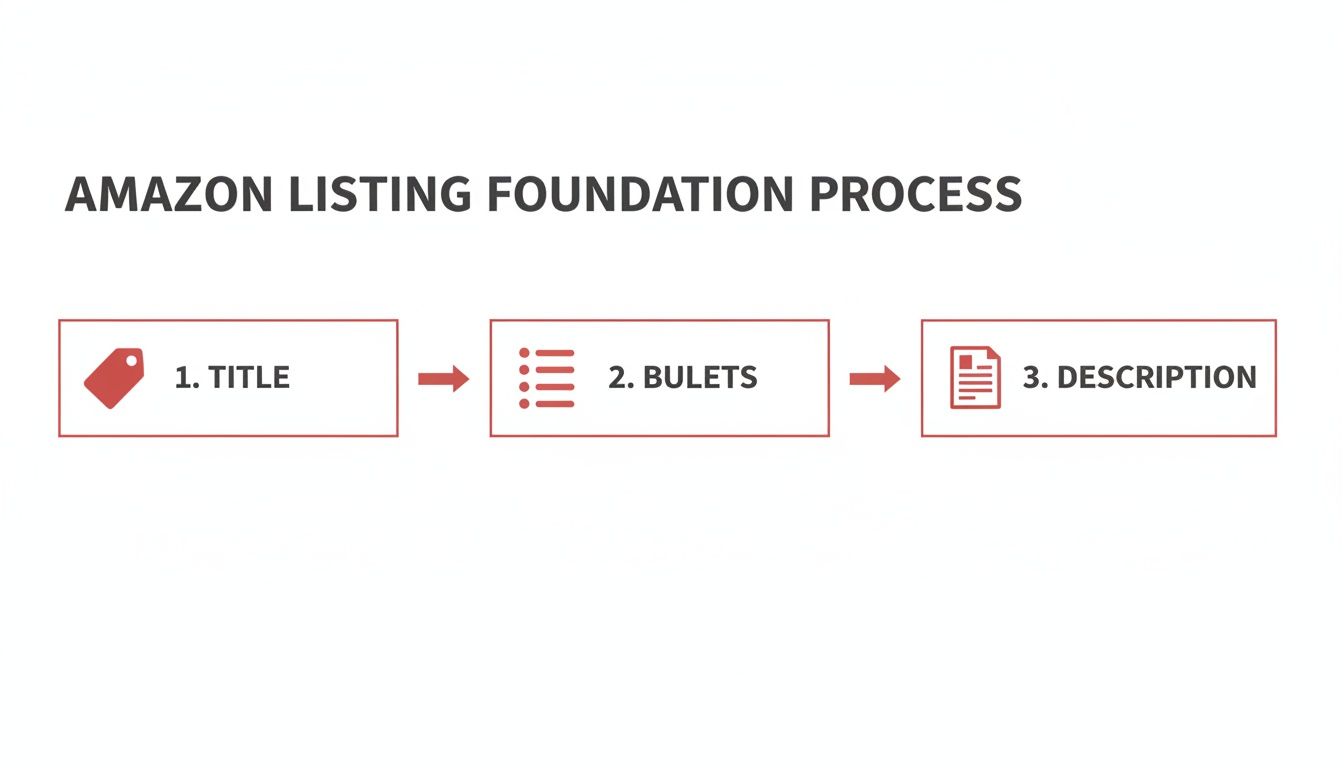
As you can see, each component builds on the last, creating a cohesive experience that guides the customer from search result to purchase.
Once a shopper clicks on your listing, your bullet points must do the heavy lifting. This is your prime opportunity to translate dry features into compelling benefits. Don't just list what your product is—explain what it does for the customer.
Think of each bullet point as an answer to an unasked question. Address potential concerns, highlight unique selling points, and solve the customer's problem before they even have to think about it.
Here’s a practical framework:
Finally, the product description is where you can tell your brand’s story and provide deeper technical details. Use this space to reinforce the benefits mentioned in your bullets while covering specifics like dimensions, materials, care instructions, or warranty information.
This section is also a great place to index for additional long-tail keywords and ensure your product has all the necessary identifiers. Getting these details right is critical for both discoverability and compliance. You can learn more by checking out our guide on Amazon product identifiers.
A well-written description builds trust and removes any lingering purchase friction by giving detail-oriented buyers the information they need to click "Add to Cart" with confidence.
Once you’ve nailed your keywords and copy, your visuals become the most important factor in a customer's buying decision. Shoppers can't touch or feel your product online; your images and A+ Content must build trust and spark desire in seconds.
This isn't just about meeting Amazon's technical requirements. It’s about crafting a visual story that stops the scroll and turns a curious browser into a confident buyer.
Your primary image must be on a pure white background, but your other image slots are where you can bring your product to life. Think of these slots as a mini-sales presentation.
Your goal is to answer questions visually before a shopper even thinks to ask them. Use this prime real estate to show different angles, highlight key features with clean text overlays, and, most importantly, show the product in a real-world context. For a deep dive into creating images that sell, check out our complete guide on product photography for Amazon.
Here’s a practical framework for your visual story:
The impact is measurable. We've seen brands boost sales by an average of 77% within weeks of professional visual optimizations. Clear, multi-angle images build the trust needed to convert in a marketplace where Amazon holds a 37.6% share of U.S. ecommerce.
If you're brand-registered, A+ Content is one of the most powerful conversion tools available. It lets you replace the standard text description with a visually rich layout packed with images, custom text blocks, and comparison charts.
A+ Content bridges the gap between a sterile online listing and an immersive brand experience. It’s your chance to control the narrative, tell your story, and differentiate your brand right on the product page.
Think of it as a dedicated landing page built directly into your Amazon listing. Use it to tell a deeper brand story, address common customer objections, and even cross-promote other products. By combining high-resolution imagery with benefit-driven copy, you guide the customer on a journey that solidifies their purchase decision.
Here's a breakdown of how to strategically use different A+ modules to tell a compelling story and drive conversions.
This table outlines different A+ Content modules, their best use cases, and the specific conversion goals they help achieve, guiding brands on how to structure their enhanced content for measurable results.
| Module Type | Best Used For | Key Benefit | Example Application |
|---|---|---|---|
| Brand Story Modules | Introducing your brand's mission, values, or history. | Builds an emotional connection and brand loyalty. | A "From the Brand" module with a photo of the founders and a short mission statement. |
| Comparison Charts | Highlighting differences between your product line. | Simplifies the buying decision and encourages upsells. | Comparing features of your 'Basic', 'Pro', and 'Premium' versions of a product. |
| Image & Text Modules | Showcasing key features with detailed explanations. | Educates customers on specific benefits and use cases. | A close-up image of a unique feature paired with text explaining why it matters. |
| Standard Image Header | Creating a strong visual opening for your A+ section. | Grabs attention and sets the tone for your brand. | A full-width lifestyle banner showing the product in an aspirational setting. |
While A+ Content doesn't directly influence search ranking, its impact on your conversion rate is undeniable. A higher conversion rate sends a powerful signal to Amazon’s algorithm that your product is a winner, which can indirectly improve your organic placement over time. This creates a flywheel effect for long-term, sustainable growth.
What shoppers don’t see on your product page is often just as important as what they do. Backend keywords are the invisible engine driving your listing’s discoverability. They are your direct line to Amazon’s A9 algorithm, telling it exactly what your product is and which customer searches it should appear in.
Think of it this way: your title, bullets, and A+ Content are the storefront display. Your backend search terms are the detailed inventory list you give the store manager (Amazon) so they know exactly where to stock your product to get it in front of the right shoppers.

This behind-the-scenes work is non-negotiable. It feeds organic traffic and sets the stage for more efficient PPC campaigns. A well-tuned backend ensures you’re not just visible, but visible to shoppers who are ready to buy.
In Seller Central, the "Generic Keywords" field is your main opportunity. You can add up to 249 bytes—and yes, it's bytes, not characters. A standard letter or number is usually one byte, but special characters can use more.
The golden rule here is to use this space for keywords that aren't already in your title, bullets, or description. Amazon only needs to index a keyword once per listing. Repeating terms is a waste of valuable space.
Treat your backend keyword field like a strategic vault. Fill it with synonyms, long-tail variations, common misspellings, and related terms that would feel unnatural in your customer-facing copy.
For example, if you sell a "waterproof hiking backpack," the backend is the perfect place for terms like "all-weather rucksack," "trail bag," or even a common typo like "hicking back pack." This strategy casts a wider net without cluttering your main listing.
Getting this right is more science than art. A few simple rules can be the difference between hitting page one and getting buried in the search results.
Here’s a quick checklist to keep you on track:
Effective keyword research means getting inside your customer’s head and understanding the exact words they use. While competitor listings are a good starting point, the real gold is in the data.
Tools like Amazon’s Brand Analytics and the Search Query Performance dashboard are invaluable. They provide real-world data on what customers are actually searching for, showing you the exact queries that lead shoppers to your products (and your competitors'). This same data-first approach applies to off-Amazon visibility, which is why we created these 10 eCommerce SEO best practices to guide your broader omnichannel strategy.
By blending these data-driven insights with a deep understanding of your customer, you can load your backend with terms that attract qualified, ready-to-buy traffic. This doesn't just boost your organic rank; it also supercharges the relevancy score for your PPC campaigns, making every ad dollar work harder. This process is a critical part of the Optimization phase in our growth model, turning a solid foundation into a high-performance sales engine.
An optimized listing isn't a one-and-done job. It’s a living system where pricing, social proof, and operational readiness must work in lockstep.
Think of it as a three-legged stool. Smart pricing helps you win the Buy Box. Positive reviews build the trust needed to convert shoppers. And healthy inventory levels ensure you can fulfill the demand you just created. If one leg is wobbly, the entire structure is at risk.
This section connects the dots between these critical pieces, showing you how they all support a high-performing and resilient Amazon presence.
Pricing on Amazon is more than just picking a number. It's a powerful lever for winning the Buy Box—the all-important spot where customers click "Add to Cart."
Since a staggering 82% of Amazon sales happen through the Buy Box, owning it is non-negotiable for serious growth.
Amazon’s algorithm weighs multiple factors, but your landed price (product price + shipping) is a heavyweight. However, this isn't a race to the bottom.
Your goal isn't just to be the cheapest; it's to have the most compelling offer. Amazon's algorithm rewards sellers who provide a great customer experience, which includes fair pricing, fast shipping, and a strong performance history.
Consistently losing the Buy Box is a major red flag that your offer is out of sync with the market. It could be your price, but don't forget to check your shipping speed or seller feedback.
To stay competitive, you need to monitor the factors that directly influence your chances of winning this crucial placement. We've broken down the most important ones below.
This table summarizes the most critical variables Amazon's algorithm considers when awarding the Buy Box. Use it to prioritize where you focus your energy.
| Factor | Importance Level | Actionable Tip |
|---|---|---|
| Landed Price | Very High | Use automated repricing tools to stay competitive, but set clear floor and ceiling prices to protect margins. |
| Fulfillment Method | Very High | Prioritize Fulfillment by Amazon (FBA) or Seller Fulfilled Prime (SFP) to meet Amazon's delivery standards. |
| Seller Rating | High | Actively monitor account health metrics and respond to customer inquiries quickly to maintain a high score. |
| Inventory Depth | Medium | Maintain sufficient stock levels. Frequent stockouts can hurt your eligibility even if other factors are perfect. |
By managing these elements, you’ll be in a much stronger position to capture and hold the Buy Box, driving more consistent sales.
On Amazon, reviews are the lifeblood of social proof. A steady stream of positive feedback validates your product quality and gives new customers the confidence to click "buy."
But reviews are more than just star ratings; they are a direct line to your customers, offering priceless feedback you can use to improve your products and sharpen your listing copy.
For example, if multiple reviews praise your product as "perfect for small apartments," that's pure gold. You should immediately work that phrase into your bullet points. This creates a powerful feedback loop where you're constantly refining your listing with the exact language your customers use.
A proactive review strategy is especially crucial for new products. Here’s how you can build momentum:
All your optimization efforts mean nothing if the product isn't in stock. Inventory management is a core part of optimizing your listings because stockouts can be catastrophic for your sales momentum.
When your product goes out of stock, your listing effectively disappears from search results. Your sales velocity halts, and your Best Sellers Rank (BSR) plummets. Reclaiming your rank after a stockout can be incredibly difficult and expensive.
Repeated stockouts can also tank your IPI (Inventory Performance Index) score, leading to storage limits and other restrictions. This is where an omnichannel strategy is a lifesaver—having backup inventory in a 3PL or physical store lets you switch to a Fulfilled by Merchant (FBM) offer to keep sales flowing.
To get your stock management dialed in, you should explore these proven 10 inventory optimization techniques.
By treating pricing, reviews, and inventory as interconnected parts of a single system, you build a listing that not only attracts customers but is always ready to convert and fulfill their orders.
Launching your Amazon listings is just the beginning. Real growth comes from a continuous cycle of testing, measuring, and refining. You can’t just “set it and forget it.”
The Amazon marketplace is always shifting. Customer search habits change, new competitors emerge, and Amazon’s algorithm is constantly evolving. That’s why we treat every listing as a living asset that needs regular attention to stay competitive.
Too many sellers ignore the powerful, first-party data Amazon provides. These tools aren't just reports to glance at; they are a roadmap showing you exactly where your growth opportunities are.
For any brand-registered seller, two tools are essential:
Digging into this data regularly is how you uncover hidden gems. You might find a long-tail keyword with a surprisingly high conversion rate—a clear signal to move that term into your title or a key bullet point. These small, data-backed tweaks add up to massive growth over time.
Generative AI has fundamentally changed how quickly and effectively we can optimize listings. It's no longer a novelty—it's a critical tool for staying ahead. AI can analyze thousands of customer reviews to find common themes, draft dozens of copy variations for A/B testing, or suggest new keyword angles.
Amazon itself is all-in. In 2023, it rolled out generative AI tools that have now been adopted by over 900,000 sellers. The results are compelling: sellers accept the AI-generated content with little to no edits 90% of the time and have reported a 40% increase in overall listing quality.
AI isn’t here to replace the strategist; it’s here to be a powerful co-pilot. It handles the heavy lifting of data analysis and content generation, freeing you up to focus on the big-picture decisions that grow your brand.
This means your team can move faster and test more ideas. Instead of spending an afternoon brainstorming five new bullet points, you can generate twenty variations in minutes, launch a split test, and let real customer data tell you which one works best. For a deeper look at this trend, check out this piece on AI's transformation of e-commerce strategy.
When you combine raw analytics with the efficiency of AI, you create a powerful system for constant improvement. Every change becomes a calculated move toward better visibility, higher conversion rates, and more sales. This is how modern brands win on Amazon.
As brands dive into optimizing their Amazon listings, the same questions tend to surface. The process can feel overwhelming with a ton of conflicting advice out there. This section cuts through the noise to give you clear, practical answers to common challenges.
Our goal is to replace uncertainty with a clear action plan so you can navigate the marketplace with confidence.

This is the number one question we get, and the honest answer is: it depends. Some technical tweaks, like updating backend search terms, can get your product indexed for new keywords within 24-48 hours. But seeing a measurable jump in sales and organic rank is a longer game.
Several factors dictate your timeline:
As a general rule, we advise clients to monitor key metrics—like sessions, conversion rate, and keyword rankings—for a full 30-day period after making significant changes. This gives you enough data to establish a new performance baseline before iterating again.
No. Repeating the same keywords in your title, bullets, and backend is a classic mistake known as keyword stuffing. It wastes valuable space and makes your listing sound robotic, which kills conversions.
Remember, Amazon's algorithm only needs to see a keyword once anywhere on your listing (including the backend) to index you for that term.
Think of your keyword strategy as a hierarchy. Your most important, highest-volume keywords belong in the title. Your bullet points and description should naturally weave in secondary keywords. The backend search term field is for everything else—synonyms, long-tail variations, and common misspellings that would look awkward in your customer-facing copy.
This approach lets you cast the widest possible net without sacrificing the persuasive flow of your listing.
Absolutely. A highly optimized listing is the foundation of any successful PPC campaign. When your listing has relevant keywords, compelling images, strong A+ Content, and a good base of reviews, it naturally converts better.
When you send paid traffic to a high-converting page, Amazon's algorithm rewards you. It sees shoppers clicking "Add to Cart," which can dramatically lower your ACoS (Advertising Cost of Sale) and improve your ad's relevance score.
Put simply, a better listing makes every ad dollar you spend work harder. It’s a core principle of our Amplification phase: build a strong organic foundation, then amplify its reach with efficient, profitable advertising. The two are completely connected.
The single biggest mistake we see is treating the Amazon listing as a "set it and forget it" task. Many brands create a listing and then don’t touch it again for months or even years.
The Amazon marketplace is incredibly dynamic. Customer search behavior changes, new competitors launch, and Amazon constantly updates its algorithm. A listing that was a top performer a year ago might be seriously underperforming today for entirely fixable reasons.
Top-performing brands understand this. They make continuous testing and optimization a standard part of their business.
This ongoing process of refinement is what separates the brands that just survive on Amazon from the ones that truly thrive and dominate their categories.
Optimizing your Amazon presence is a continuous journey, but you don’t have to do it alone. At RedDog Group, we build the strategies that connect your brand to customers across every channel, turning potential into measurable performance.
Ready to see the numbers move? Let's Talk Growth.
Leave a comment: