
Published: March 2020 | Last Updated:October 2026
© Copyright 2026, Reddog Consulting Group.

You've uploaded the product video, Amazon has approved it, and your team is ready to move on. Then you open the live listing and can't find the video beside the product images. Before sending the editor back to work, check the catalog setup. The problem may have nothing to do with the creative.
Learning how to add a video to an Amazon listing starts with deciding where that video should appear, which ASINs it should support, and what you're willing to change to make room for it.
Consider a pantry brand launching a preparation video. The listing already has a hero image, ingredient information, nutrition details, serving suggestions, and packaging views. The operator uploads the approved asset, checks the detail page, and sees the same image-heavy presentation as before.
The mistake is assuming that upload approval guarantees primary placement. Amazon allows up to four shoppable videos per ASIN, but says the product must have fewer than six images for shoppable videos to appear in the main media area, according to its product-video placement guidance.

A video needs a defined job. For a powdered beverage, that might be showing preparation and finished consistency. For a household cleaner, it might be demonstrating application rather than repeating claims already visible on the label.
Compare that job with what each existing image contributes. An ingredient panel and a lifestyle photograph aren't interchangeable, and removing useful buying information just to expose a video can be a poor trade.
Practical rule: Treat the video as a candidate for valuable merchandising space, not an attachment to the listing.
This belongs inside a broader Amazon listing optimization process. Fixing visibility without considering the surrounding images can leave shoppers with a more polished presentation but less useful information.
Brand Registry isn't universally required. Amazon's seller eligibility guidance says both Brand-Registered and non-Brand-Registered sellers may upload product videos, with the account generally needing more than three months of activity and an existing ASIN. Check the relevant marketplace rather than assuming eligibility transfers unchanged across accounts or placements.
Use the following graphic as an audit reminder, not as a substitute for those rules. Its Brand Registry and Buy Box wording shouldn't be read as universal upload requirements.
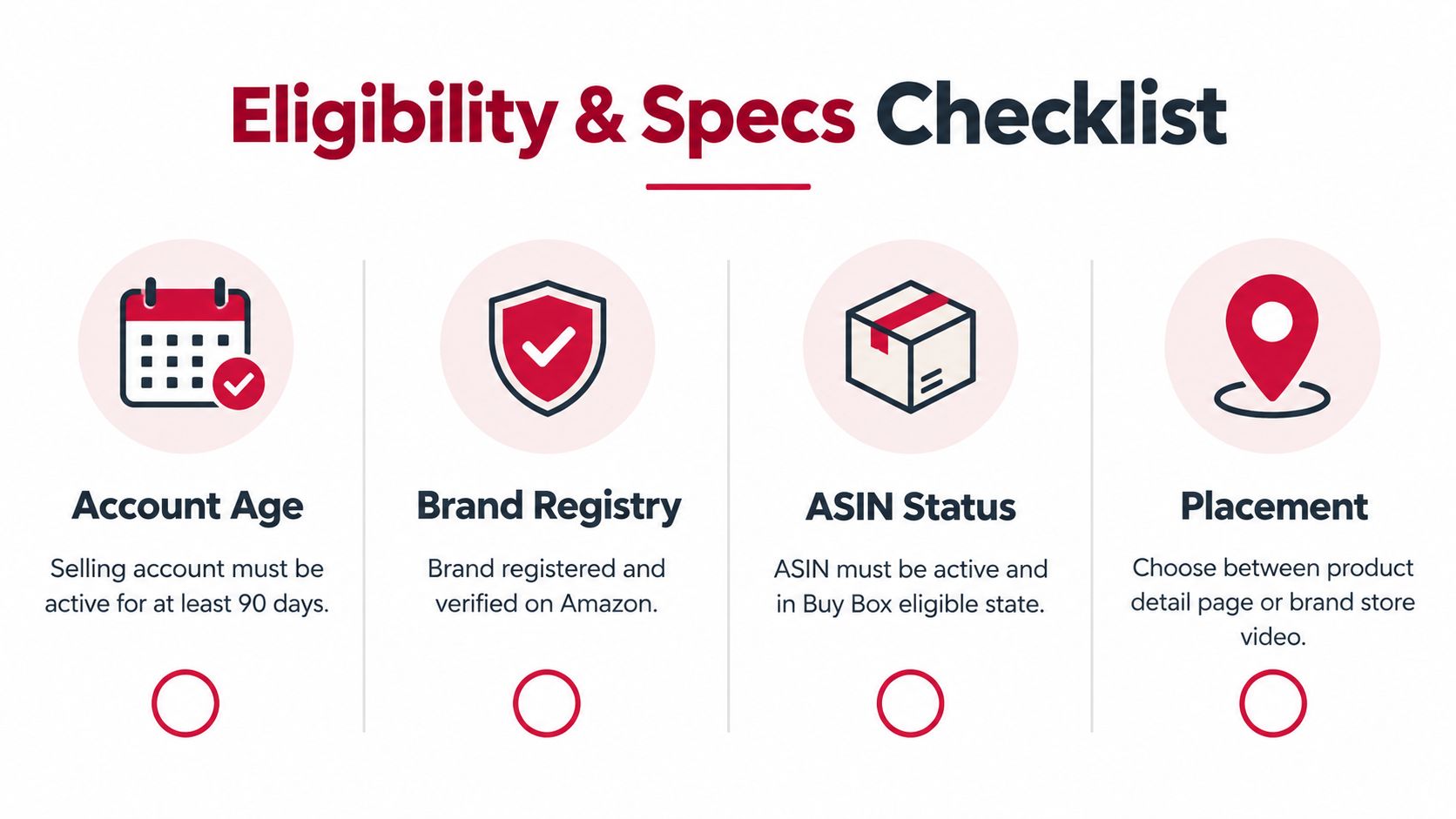
Before commissioning production, confirm:
Amazon accepts MOV or MP4, files up to 5 GB, resolution up to 1080p, durations of 1 to 12 minutes, and either 16:9 horizontal or 9:16 vertical orientation; custom thumbnails may be JPEG, PNG, GIF, or BMP under 5 MB, according to its listing-video technical requirements.
Give those limits to the editor before production starts. A finished social asset isn't automatically a compliant listing asset, even if the product demonstration itself is useful.
For organizing deliverables with an outside producer, ShipTeaser launch video specs can serve as an additional planning resource. Amazon's requirements remain the acceptance criteria, and the production agreement should specify who handles corrections if an export or thumbnail doesn't comply.
Keep Seller Central open alongside your ASIN map, final video, and thumbnail. Amazon's documented path is Catalog → Upload and Manage Videos → Upload video, followed by the file upload, required details, and submission for moderation through its video upload workflow.
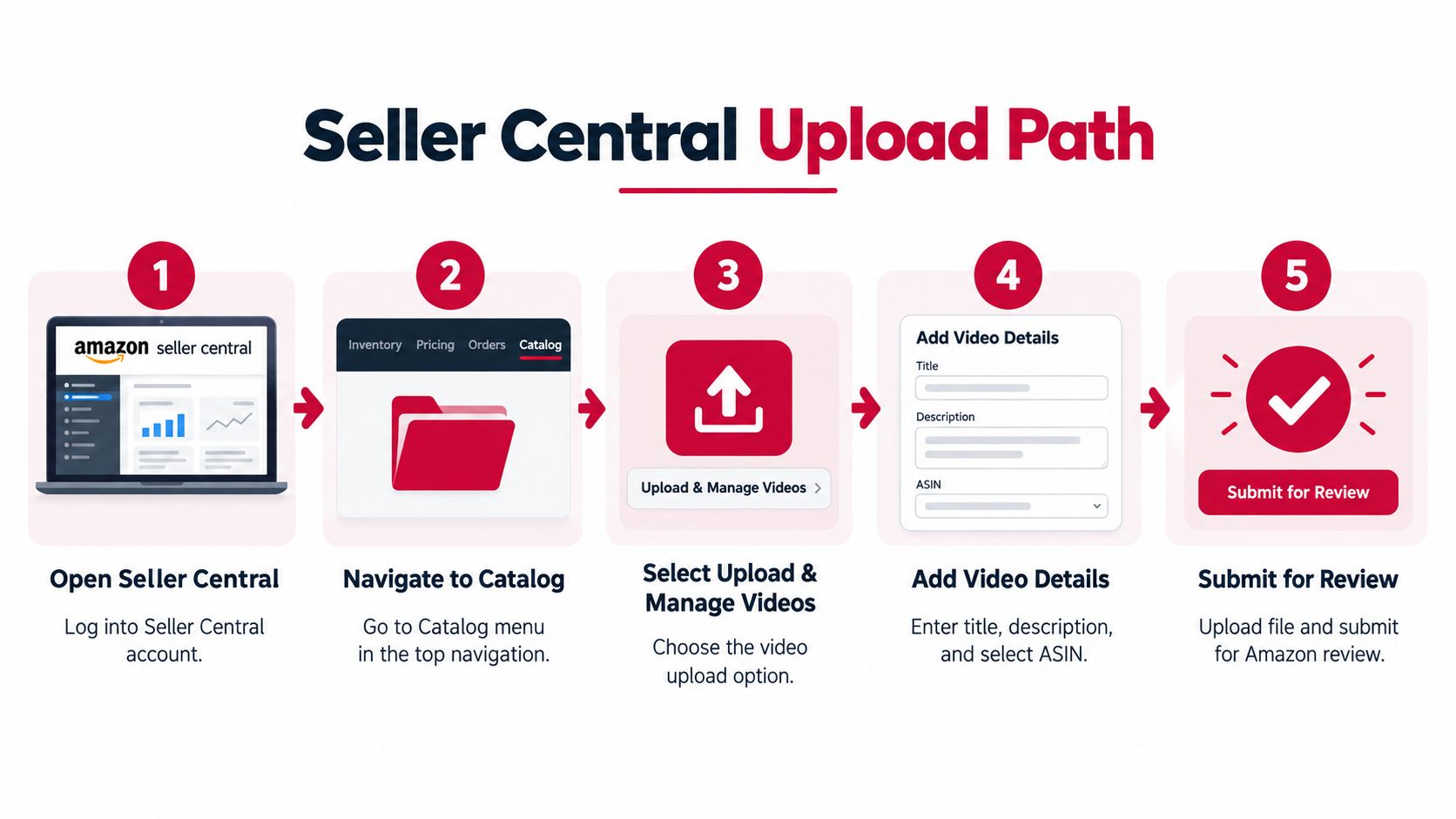
Upload the final file, then work through the actual fields in your account. Use the graphic for navigation, but follow the live form rather than assuming every illustrated field will appear.
| Field | What to enter | Operational check |
|---|---|---|
| Video title | A clear description of the demonstration | Match the content rather than adding promotional promises |
| Target ASINs | The products the video accurately represents | Verify the variation mapping |
| Language | The language used in the asset | Check spoken audio and on-screen text |
| Video type | The category matching the content | Distinguish an overview from a how-to demonstration |
| Thumbnail | The approved product-focused image | Confirm it matches the uploaded version |
Don't treat the title as a place to cram search terms. A useful title tells the shopper what they'll learn and helps the operator identify the asset later.
If you're unfamiliar with the account interface, this overview of what Amazon Seller Central is provides broader operational context. For this task, stay focused on the catalog, asset details, and moderation status.
A parent ASIN association isn't a substitute for checking the child products shoppers select. Build the mapping deliberately, then inspect the relevant live variations after approval rather than assuming the association propagated as intended.
For example, a preparation video may work across flavors when the method is identical. It may not work across different pack formats if the footage implies every order includes the same quantity or accessories.
Assign that final inspection to a named owner. “Uploaded” and “verified live” should be separate statuses in the launch tracker.
A compliant export matters, but it doesn't guarantee approval. The editor also needs a clear boundary between demonstrating the product and making claims the brand can't support.
Use H.264 MP4 as the production export preset, within the resolution and size limits established above. Don't send an editor a vague request for an “Amazon-ready video” and expect everyone to interpret it the same way.
| Setting | Requirement | Why It Matters |
|---|---|---|
| Export | H.264 MP4 within the audited upload limits | Gives the team a consistent delivery format |
| Runtime and orientation | Match the eligibility checklist | Prevents avoidable re-editing |
| Thumbnail | Product immediately recognizable, using an accepted image format | Helps shoppers understand what the video covers |
| Opening | Show the product being used | Establishes relevance without a packaging-only introduction |
| Claims | Use supportable product statements | Avoids promising results the brand can't substantiate |
| References and audio | Avoid competitor references and copyrighted music | Reduces preventable content risk |
| Text | Keep essential information readable on mobile | Preserves the demonstration's usefulness on smaller screens |
For a drink mix, show preparation and the finished drink before lingering on the pouch. For a cleaning product, demonstrate the application conditions clearly enough that shoppers don't infer a use the product doesn't support.
A useful sequence is use case, differentiating feature, setup or conditions, likely objection, finished product view. The footage should explain something a still image struggles to communicate, not stretch a label photograph into a video.
The opening should help a shopper understand the product, not make them sit through the brand's introduction.
When briefing a producer, RemotionAI's resource on how to make product videos that sell offers an additional creative planning reference. Keep the acceptance checklist separate from creative inspiration.
Before export, watch the asset without sound and review the thumbnail at a small size. Check product identity, pack format, text legibility, and whether the demonstration remains understandable without narration.
Amazon reports an average 24% sales increase for detail pages receiving their first shoppable video versus pages without videos, alongside seller-education figures of up to 9.7% sales gains and video viewers being 3.6 times more likely to convert, in its product-video performance discussion. These are different benchmarks, not additive gains or guaranteed causal outcomes.
The illustration below is a dashboard example, not a case study, forecast, or target for your brand.
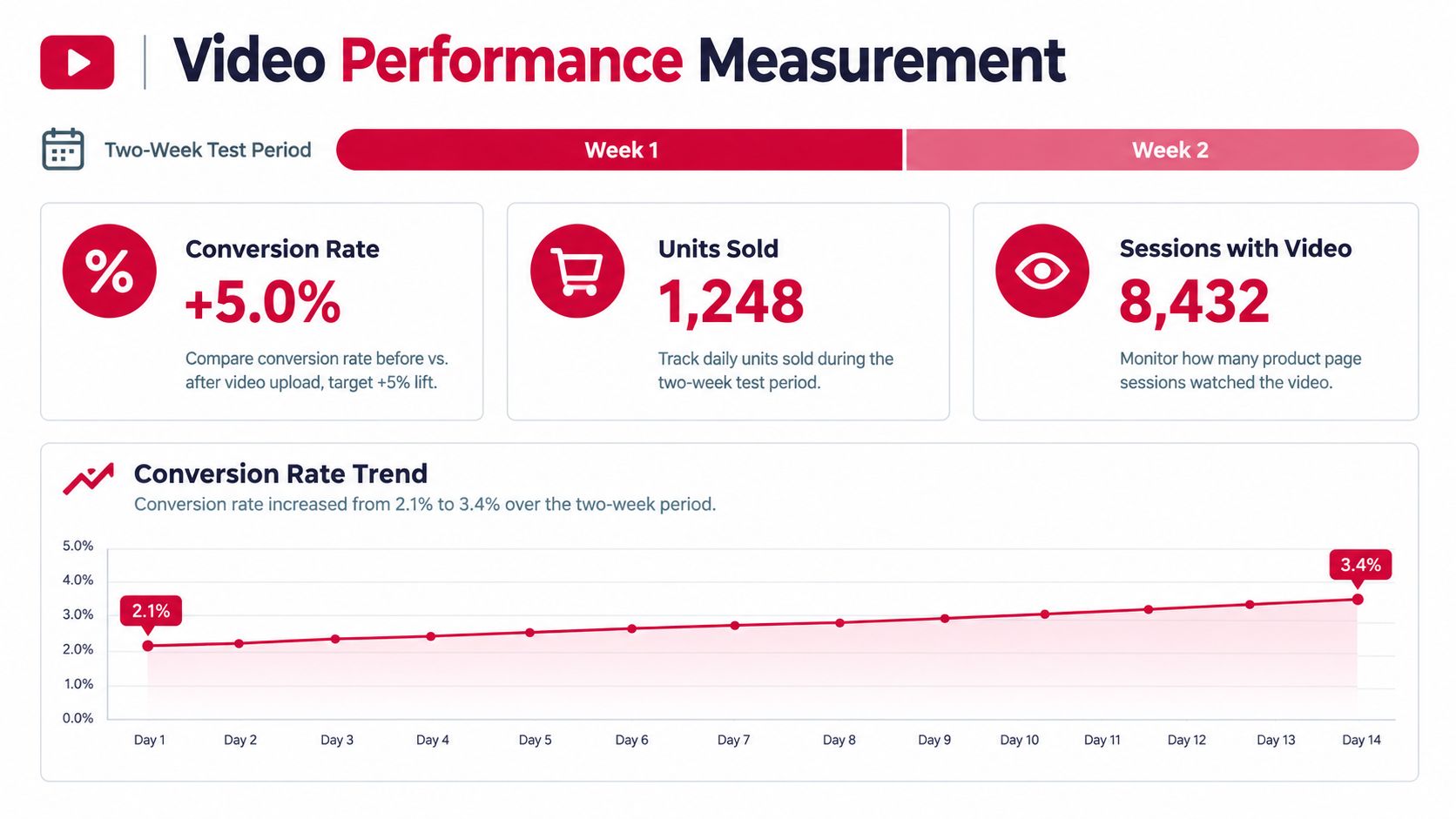
Record a pre-launch baseline and compare an equivalent post-launch period. Hold price, inventory availability, advertising, promotions, and Buy Box status steady where possible; record changes when you can't.
| Metric | What to record | What to investigate |
|---|---|---|
| Sessions | Detail-page traffic | Whether traffic volume or quality changed |
| Unit-session percentage | Purchase conversion | Whether shoppers became more likely to buy |
| Ordered units | Units purchased | Whether conversion gains translated into demand |
| Contribution margin | Sales less relevant variable costs | Whether additional orders generated worthwhile contribution |
| Return rate | Returns associated with the product | Whether the demonstration set accurate expectations |
Contribution margin is the commercial check. Include product cost, marketplace and fulfillment charges, advertising, and other relevant variable costs consistently across both periods. Keep production spending visible as an investment the incremental contribution needs to recover.
If video views are strong but conversion doesn't improve, test the thumbnail and opening before paying for a complete reshoot. If conversion improves while contribution deteriorates, examine pricing, advertising, and cost changes before crediting the creative.
Klap's video marketing ROI measurement is a supplementary planning resource for organizing that review. Keep the listing test connected to your wider ecommerce conversion-rate improvement work, but don't change the entire page during the same comparison.
A before-and-after review supports a decision. It doesn't prove that video alone caused the result.
A sharper video isn't automatically a better use of the budget. If inventory is constrained or the current pack is about to change, production can create work the business isn't ready to benefit from.
Amazon also gives the most recently uploaded video display priority, as noted in the earlier placement guidance. Uploading a replacement is therefore a merchandising change, not just file maintenance.
The image-slot decision deserves particular care in CPG. Ingredient, nutrition, usage, and pack-detail images can answer questions that determine whether someone should buy the product at all.
A preparation demonstration may justify removing a repetitive lifestyle image. Removing the clearest pack-content image could create confusion instead, especially when similar variations contain different quantities.
A video that sells the wrong expectation can create more operational work than commercial value.
Consider a brand preparing new packaging while older units remain available. Filming only the new pack may create a mismatch; filming only the old pack may shorten the asset's useful life. A demonstration focused on accurate product use may offer a more durable approach.
The same discipline applies when fees compress margin. Prioritize assets that resolve a meaningful purchase objection, and compare the production investment with other uses of cash, including inventory availability and existing listing corrections. Don't fund a reshoot because the current video looks less polished than a competitor's.
Use Foundation → Optimization → Amplification as an operating sequence, not permission to spend on every stage at once. Each stage should resolve a different constraint before the team commits more resources.
Foundation means confirming access, product readiness, and placement feasibility. The output is an ASIN-level decision about whether video belongs in the current media mix, not merely a creative request.
Optimization means producing an accurate demonstration, completing the upload carefully, and verifying the customer-facing result. The output is a usable asset associated with the right products, with someone accountable for maintaining it.
Amplification means using performance evidence to decide whether to revise, extend, or stop. Expansion should follow a credible contribution-margin result rather than an attractive view count.
The next concrete action is a listing audit, not an editor search. Assemble the current media set, variation map, packaging plans, and margin view. That gives the operator enough context to decide whether video is the right intervention and what success would need to look like.
Reddog Consulting Group helps CPG founders and operators connect marketplace merchandising, inventory, pricing, and contribution margin. Book a free 30-minute strategy call for a working session on your Amazon video plan, catalog readiness, and the margin conditions that should guide the investment, not a generic sales pitch.
Leave a comment: