
Published: March 2020 | Last Updated:February 2026
© Copyright 2026, Reddog Consulting Group.

Let's get one thing straight: Amazon Seller Central isn't just another dashboard. For a CPG brand, it's the cockpit of your entire marketplace operation. It’s the nerve center that connects your products, pricing, inventory, and ads directly to millions of customers. Think of it as your brand's direct-to-consumer gateway on Amazon, giving you control over your destiny—and making you responsible for every single outcome.
Most people see a sales dashboard. An operator sees a set of economic levers. Mastering Seller Central isn't about memorizing where the buttons are; it's about understanding how every single action—from tweaking your inventory velocity to adjusting your PPC ad spend—hits your contribution margin.
If you need a basic rundown, plenty of guides can explain What is Amazon Seller Central from a high level. But for those of us in the trenches, the real meaning is in how you use it.
This interface is what the industry calls the '3P' (third-party seller) model. It’s where you lay the operational foundation for a business that can actually scale on Amazon. It forces you to stop thinking about logistics, marketing, and finance as separate silos. On Amazon, they’re one interconnected system where a single decision in one area sends an immediate financial ripple through the others.
Make no mistake, Seller Central is both a land of incredible opportunity and a brutal, hyper-competitive battlefield. The numbers don't lie. While there are millions of registered sellers globally, you're competing against roughly 1.9 million active sellers for the Buy Box.
In this environment, operational excellence isn't just a nice-to-have; it's the price of entry. Sure, tens of thousands of independent sellers blew past $1 million in annual sales, but that success comes from nailing the small details day in and day out. The platform’s complexity is a feature, not a bug—it’s designed to reward operators who truly get the economics of the channel.
To give you a clearer picture of how an operator thinks, here’s a quick breakdown of what each core function in Seller Central really controls.
This isn't just a feature list. It's a map showing how day-to-day tasks connect directly to your brand's financial health and profitability.
| Core Function | What It Controls | Direct Impact on Contribution Margin |
|---|---|---|
| Listing Management | Product visibility, conversion rates, and SEO ranking. | Higher conversion from optimized content means lower effective advertising costs and improved sales velocity. |
| Inventory Management | Stock levels, restock timing, and storage fee exposure. | Avoids lost sales from stockouts and minimizes long-term storage fees that erode profit. |
| Order Management | Fulfillment speed, customer communication, and return processing. | Efficient handling reduces order defect rates, protecting your account health and avoiding costly chargebacks. |
| Advertising (PPC) | Customer acquisition cost (CAC), brand visibility, and sales velocity. | Optimized ad spend (ACOS/TACOS) directly protects your margin on every unit sold. |
| Reporting & Analytics | Sales trends, profitability per ASIN, and inventory health. | Gives you the data to cut unprofitable products and double down on winners, maximizing overall profitability. |
The main dashboard isn't just a summary of sales; it's a real-time health report for your business. It shows everything from order volume and payment summaries to critical performance notifications that can get your top-selling listing shut down without warning. This is where you live as an operator—constantly watching the inputs and outputs to protect your margins and stay ahead of the game.
If you want to run a profitable Amazon channel, you have to stop thinking of Seller Central as just a dashboard. It’s a set of five interconnected levers that directly control your bottom line. A small tweak in your inventory levels sends immediate ripples through your ad spend, and a pricing adjustment can make or break your entire sales velocity.
Getting a handle on this cause-and-effect relationship is what separates the brands that just sell on Amazon from the ones that actually build a profitable business. Let's break down these core functions not by their official names, but by the real-world financial outcomes they control.
This isn't just about counting widgets. Inventory management is a constant, high-stakes balancing act. On one side, you have inbound shipping costs and Amazon's storage fees. On the other, you have the catastrophic ranking penalty of a stockout. Amazon's A9 algorithm is obsessed with sales velocity—products that sell through quickly get rewarded with higher organic rank.
The moment you go out of stock, you don't just lose sales; you lose relevance. The algorithm effectively "forgets" your product exists, and you'll have to burn a ton of ad dollars just to claw back the visibility you once had for free. Every decision, from your restock quantity to your Inventory Performance Index (IPI) score, is a direct input into your profit margin.
Your product listing isn't just a piece of marketing copy; it's a conversion machine. The quality of your title, bullet points, and images directly impacts your unit session percentage (your conversion rate). A higher conversion rate means you need fewer clicks to land a sale, which in turn lowers your Advertising Cost of Sale (ACOS). Simple as that.
Pricing is the other half of this puzzle. It’s the primary driver of your Buy Box win rate, which is non-negotiable for running ads. If your pricing is off and you lose the Buy Box, your ads simply won't run. Both of these elements—listing quality and price—work hand-in-hand to dictate how efficiently you can acquire new customers.
Choosing between Fulfillment by Amazon (FBA) and Fulfillment by Merchant (FBM) is one of the most critical decisions you'll make, defining your landed cost for every single unit. FBA gets you that coveted Prime badge and handles the logistics, but it comes with a dizzying fee structure. You're not just paying for fulfillment and storage; you're now dealing with inbound placement fees that can add unexpected costs out of nowhere.
FBM puts you back in the driver's seat, giving you full control over your inventory and fulfillment costs. But with that control comes total responsibility—the entire burden of pick-and-pack, shipping, and customer service falls on your team. The only way to know which path is right is to model both scenarios to find the true break-even point for your specific products. Our guide on mastering Amazon Seller Central strategies digs much deeper into these trade-offs.
Think of the Advertising Console less like a marketing expense and more like an investment vehicle for buying customers and boosting your organic rank. Every dollar you pour into Sponsored Products needs to be measured by its return. The key here is calculating your break-even ACOS: the absolute maximum you can spend on ads before a sale turns unprofitable.
For example, if your product sells for $30 and your total cost of goods and Amazon fees (before ads) is $21, you have $9 of contribution margin. Your break-even ACOS is ($9 / $30) = 30%. Any ACOS below that is profitable. Anything above it is a strategic loss you're taking to either drive rank or liquidate aging inventory.
This is where the truth lives. The data in these reports is what allows you to make smart financial decisions instead of just guessing. Your Business Reports dashboard will show you traffic, conversion rates, and sales by ASIN, letting you quickly spot your winners and losers. The Inventory Age report is an essential cash flow tool, flagging which units are about to get hit with costly long-term storage fees.
For small and mid-sized CPG brands, Seller Central offers incredibly powerful tools for scale. FBA, for example, was used by a staggering 82% of sellers in 2024. But access doesn't guarantee success. Only 19% of sellers actually broke $100,000 in monthly sales. These numbers prove just how vital a structured, data-driven approach to profitability really is. You can find more insights in this report on Amazon's third-party seller landscape.
Choosing between Seller Central and Vendor Central isn't just a logistics decision—it's a choice that defines your entire financial reality on Amazon. This decision impacts everything from your P&L and cash flow to how much control you have over your brand. It’s the foundation of your channel strategy, so getting the numbers right is non-negotiable.
The simplest way to look at it is control versus simplicity.
With Seller Central (the 3P, or third-party, model), you keep full control over your brand, but you also take on all the operational and financial weight. On the other hand, Vendor Central (the 1P, or first-party, model) simplifies your life by having you sell wholesale directly to Amazon, but you give up control over pricing and how your brand is presented.
The biggest difference comes down to gross margin. As a 3P seller, you’re in the driver's seat—you set your own retail price. After Amazon’s referral fees (usually around 15% for most CPG categories) and FBA fees, a well-run brand can often walk away with a gross margin of 40-60%. You have direct command over your unit economics.
It’s a different story in the 1P model. Here, Amazon buys from you at a wholesale price, meaning you instantly hand over a huge chunk of your margin. Most brands end up with wholesale margins of just 30-45%. And it doesn't stop there. Amazon then hits you with various chargebacks and co-op fees for things like damage allowances or marketing funds, which can chew up another 5-10% of your profit.
But the real loss in the 1P model isn't just about margin—it's the complete loss of pricing control. Once Amazon owns your inventory, they can slash the price to whatever they want to win the Buy Box. This often triggers price wars that destroy your MAP (Minimum Advertised Price) policy and create massive channel conflict with your other retail partners like Target or Walmart.
The cash flow dynamics couldn't be more different. As a 3P seller, you get paid every two weeks based on what you’ve sold. The catch? You carry 100% of the inventory risk. Every single unit sitting in an FBA warehouse is yours, and if it doesn’t sell, you’re the one paying storage fees and, eventually, removal fees.
As a 1P vendor, Amazon sends you large purchase orders (POs), and you get paid on net 30, 60, or even 90-day terms. Those big POs might feel like a huge win, but the long payment cycles can seriously strain the cash flow of a growing brand. While Amazon shares some inventory risk, they can also return unsold products or just stop sending POs altogether, leaving you high and dry with a pile of excess stock. Our deep dive into what is Amazon Vendor Central covers these operational headaches in much more detail.
This chart helps break down the fulfillment side of the equation, which is a core part of the Seller Central model.
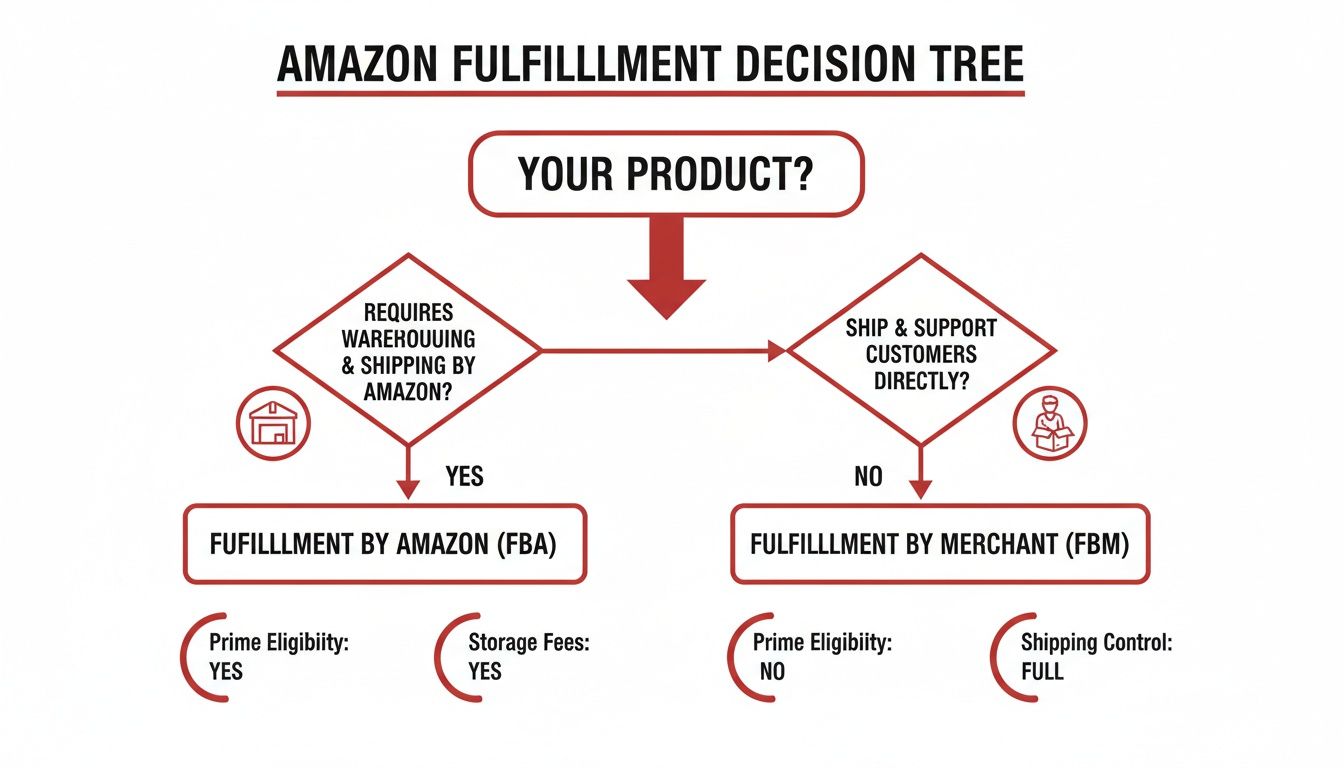
As you can see, you have two main paths in the Seller Central world: FBA, where you let Amazon handle logistics, and FBM, where you manage it all yourself.
This table cuts right to the chase, laying out the economic and operational realities you'll face on each platform.
| Factor | Seller Central (3P Operator) | Vendor Central (1P Supplier) |
|---|---|---|
| Margin Potential | Higher (40-60% gross) but variable; you absorb all fees. | Lower (30-45% wholesale) and compressed by chargebacks and co-op fees. |
| Pricing Control | Total control. You set the retail price and can maintain MAP. | No control. Amazon sets the retail price, often leading to MAP violations. |
| Cash Flow | Faster payment cycle (every 2 weeks). | Slower payment terms (Net 30/60/90) tied to large POs. |
| Inventory Risk | You own all inventory. Subject to FBA storage fees and stockout risk. | Shared risk, but Amazon can return unsold goods or halt POs without warning. |
| Operational Lift | High. You manage listings, PPC, inventory, and customer service. | Lower. Simplified to PO fulfillment and invoicing. |
| Customer Data | Full access to customer behavior data through Brand Analytics. | Limited access to data; Amazon owns the direct customer relationship. |
Ultimately, the right choice boils down to your brand’s maturity, operational muscle, and long-term goals. Seller Central offers a clear path to higher profits and stronger brand equity, but it demands serious operational know-how. Vendor Central offers a simpler route to high volume, but it comes at the steep price of margin and control. For most growth-focused brands, building a solid foundation on Seller Central is the smarter long-term play.
Too many brands crash and burn on Amazon, not because their product is bad, but because they completely miscalculate how much it actually costs to operate on the platform. Making a profit isn't about your top-line sales number; it's about what’s left in your pocket after Amazon takes its slice of the pie.
Getting a handle on these costs is what we call the 'Optimization' phase of growth. It's the difference between having a revenue stream and building a truly profitable channel. So let's go beyond a simple list and see how these fees actually hit your bottom line. Without a clear picture, you’ll find yourself working for Amazon instead of the other way around.

The first costs you'll encounter are for your account and Amazon's commission. They're the most straightforward, but there are still details every operator needs to nail down.
These two fees are predictable and set the baseline for your unit economics. But this is where things start getting a lot more complicated, especially if you’re using FBA.
Fulfillment by Amazon (FBA) is the fastest path to getting that Prime badge, but it comes with a tangled web of fees that can chew through your margins if you're not careful. These costs aren't fixed—they shift based on your product’s size, its weight, and even how long it sits on a warehouse shelf.
The main FBA fee covers the cost of someone picking, packing, and shipping your product to the customer. For a standard-size item under a pound, you might pay anywhere from $3.22 to $4.08. That number climbs fast as your item gets bigger or heavier.
But that fulfillment fee is just the start. You also have to deal with:
This fee structure means that inventory velocity isn't just a sales metric; it's a direct lever for managing your costs. Slow-moving products don't just tie up cash—they actively cost you money every single day.
Let's break this down with a real product: a 12 oz. bag of specialty coffee.
Now, let's start subtracting the Amazon costs:
After all of Amazon’s fees, your net profit per unit is just $3.59. That’s a contribution margin of 18%. And this calculation doesn't even account for returns, damaged goods, or any long-term storage penalties you might get hit with.
Without this level of detail, a brand might think their margins are healthy, leading to terrible decisions on pricing and ad spend. This constant exercise in protecting that final number is what Amazon Seller Central is all about.
Seller Central gives you incredible control and a direct line to millions of customers. But with that power comes a ton of risk—the kind many brands don't see until their revenue suddenly flatlines. The dashboard looks simple enough, but the system behind it is anything but forgiving.
Let’s be real about three major hazards that catch even experienced operators off guard.
First up is the black box of Amazon support and the constant threat of suspension. One day you’re selling, the next you’re not. An unexpected account deactivation or ASIN suppression for a minor infraction—often flagged by an algorithm, not a human—can shut down your entire business overnight.
Imagine this: your top-selling product, the one that brings in 60% of your revenue, is suddenly inactive. Why? A bogus intellectual property complaint from a shady competitor. Your inventory is now stranded, your sales have stopped cold, and you’re stuck in an endless loop of automated responses from Seller Support. Without a solid plan of action and knowledge of how to escalate the issue, you could lose weeks of sales and kill your product's hard-earned organic rank for good.

The second landmine is the sheer weight of being the "seller of record." This isn't like a simple wholesale deal where you ship a pallet and wait for a check. As a 3P seller, you are on the hook for everything. Every single operational detail is your problem, and the financial hit for messing up is immediate.
This responsibility bleeds into areas most founders completely overlook:
The trade-off for higher margins and pricing control is absolute accountability. In Seller Central, there is no one else to blame when a shipment is late, a customer is unhappy, or a new fee is introduced. The platform demands a level of operational discipline that many DTC brands are unprepared for.
Finally, and this might be the most critical point, is the crushing pressure on your cash flow and inventory. That Inventory Performance Index (IPI) score isn't just some number on your dashboard; it's a lever Amazon uses to control your ability to operate.
A low IPI score, usually from having too much or slow-moving inventory, results in tight FBA storage limits. This means you might not be able to send in enough stock for your bestsellers during Q4, putting a hard cap on your own growth. And that slow-moving inventory? It’s not just tying up cash—it's actively costing you money in monthly and long-term storage fees, turning a once-profitable product into a cash-burning liability.
This creates a vicious cycle. You need enough stock to prevent stockouts and keep your sales velocity up, but having too much inventory tanks your IPI and drains your bank account. Nailing this delicate balance is a core skill for any brand that wants to scale profitably. For brands that can't get it right, they'll find themselves constantly trapped by their own operational mistakes.
Jumping into Amazon isn't as simple as just signing up and throwing some products online. For serious CPG brands, the real work happens before you launch. This is where you build the operational muscle that prevents costly cleanups later and paves the way for profitable growth.
Think of it this way: you wouldn't build a house without a solid foundation. This checklist is that foundation. Getting these things wrong—or skipping them entirely—is a surefire way to derail your launch before it even begins. Each step is non-negotiable for protecting your brand and your bottom line.
First things first, get your paperwork in order. Amazon’s verification process is notoriously strict, and showing up with incomplete or mismatched documents is the fastest way to get your account suspended before you’ve even sold a thing.
Make sure you have these ready to go:
This part is purely administrative, but it’s the first gatekeeper. Any little discrepancy will bring your progress to a dead stop.
Once your legal ducks are in a row, it’s time to protect your brand assets. If you launch without securing your brand, you’re basically inviting counterfeiters and listing hijackers to the party from day one. It also means you’re locked out of the powerful marketing tools you need to actually grow.
This is it. This is the most critical pre-launch step—and the one most brands conveniently skip. Before you sink a single dollar into inventory or ads, you have to model your unit economics with brutal honesty. You need to know if you can actually make money on Amazon.
Build a spreadsheet that maps out every single cost on a per-unit basis. Start with your landed COGS, then systematically subtract every anticipated Amazon fee—referral fees, FBA fulfillment and storage costs, inbound placement fees—and a realistic budget for launch advertising (ACOS).
If the number at the end is negative or razor-thin, you have a problem. This isn't a "we'll figure it out later" issue. It's a flashing red light telling you to fix your pricing, sourcing, or channel strategy before you go any further. This financial diligence isn't just smart; it's the very core of a strong operational launch.
As your brand grows on Amazon, you’ll eventually hit a fork in the road. Do you keep managing everything yourself, or is it time to bring in an expert agency? This isn’t just about budget—it’s about your team's capacity, where you want to focus your energy, and knowing when you’ve pushed your in-house skills as far as they can go.
For brands just starting out, handling Amazon internally is almost always the right call. It’s the best way to get a real, hands-on education in how the platform works, from its unforgiving economics to its daily operational headaches. But sooner or later, certain red flags start waving, signaling it’s time to call in a specialist.
The most obvious trigger is when your growth stalls or your profits start shrinking. If your sales have flatlined but your Advertising Cost of Sale (ACOS) keeps creeping up, it’s a clear sign your current strategies have run their course. You need advanced PPC optimization, better inventory velocity management, and smarter listing conversion tactics to punch through that ceiling.
Another huge signal is operational burnout. Is your team spending more time fighting with Seller Support, fixing suppressed listings, and untangling inventory messes than they are on building the brand or developing new products? If so, you’ve hit a point of diminishing returns. The administrative black hole of Seller Central is pulling focus from what actually grows your business.
Finally, complexity kills. Expanding into new marketplaces like Canada or the EU, launching a huge catalog with dozens of child variations, or battling constant account health warnings—these challenges demand specialized knowledge that most in-house teams just don’t have.
This isn't about admitting defeat. It's about making a strategic investment in growth. It’s recognizing that your time is better spent building an amazing product and brand, while a dedicated partner focuses on squeezing every last drop of contribution margin out of the channel.
When you're weighing this decision, it helps to have a solid framework for how to choose a digital marketing agency that truly gets your goals. You're not just looking for someone to run your ads; you need a partner who understands the operational and financial realities of the CPG world. To dig deeper into this, check out our guide on hiring an Amazon marketplace consultant. If you've hit these inflection points and you’re ready for structured, margin-focused growth, a strategic partner might be your next best move.
If your brand is struggling with fee compression, inventory pressure, or stalled growth on Amazon, let's talk numbers. Book a free 30-minute strategy call to dig into your channel economics and build a clear plan for improving your contribution margin.
This is a working session, not a sales pitch. Schedule your complimentary margin and growth review here: https://www.reddog.group/pages/cpg-retail-growth-offer
Leave a comment: