
Published: March 2020 | Last Updated:January 2026
© Copyright 2026, Reddog Consulting Group.

Running a retail operation when your ecommerce systems refuse to work together can feel like driving with the brakes on. Disconnected inventory, scattered customer data, and slow feature rollouts make it hard to compete with nimble rivals offering seamless experiences. For American retailers held back by outdated technology, ecommerce replatforming removes those barriers and positions your business for future growth. This guide breaks down practical strategies and core benefits, giving you a clear path to better omnichannel performance and stronger sales.
| Point | Details |
|---|---|
| Ecommerce Replatforming Necessity | Transitioning from legacy systems to modern platforms is crucial for retailers to grow and meet customer expectations in an omnichannel environment. |
| Types of Replatforming Strategies | Choose the right replatforming strategy—API addition, partial replacement, platform migration, or full core system replacement—based on your specific needs and limitations. |
| Triggers for Replatforming | Common triggers include outdated systems, poor omnichannel support, security vulnerabilities, and operational inefficiencies that impact business performance. |
| Planning and Risk Management | Effective planning, communicating with stakeholders, and a phased migration approach can significantly mitigate the risks associated with replatforming. |
Imagine running your entire online business on a platform that can’t keep pace with your growth. Your inventory system doesn’t communicate with your marketplace channels. Customer data lives in isolated databases. Adding new features takes months instead of weeks. This is the reality for many small and medium-sized retailers stuck on legacy systems that weren’t built for today’s omnichannel world. Ecommerce replatforming is the process of moving away from these outdated systems to modern, cloud-based platforms that can actually support your business ambitions.
At its core, replatforming means transitioning legacy systems to digitized platforms designed for current and future business needs. For retailers, this isn’t just a technical upgrade. It’s about eliminating the constraints that prevent you from selling across multiple channels simultaneously, responding to customer demands in real time, and scaling your operations without hitting a ceiling. A retailer stuck on an older platform might spend months coordinating between their website, Amazon storefront, and in-store systems manually. After replatforming, those channels sync automatically, inventory updates instantly, and customer data flows seamlessly across touchpoints. The difference isn’t subtle. It changes how fast you can move.
Replatforming takes multiple forms depending on your situation. You might add APIs to integrate with modern tools while keeping your existing system running in the background. You could build a parallel platform that gradually takes over key functions. Or you might undertake a complete replacement, moving everything to a cloud-based solution. The approach depends on your current infrastructure, budget, and timeline. What matters is that success requires clear communication with your leadership team about what a future-ready platform actually looks like, what the costs will be, and what risks you’re managing along the way. When your stakeholders understand the specific limitations holding you back and how replatforming solves them, getting buy-in becomes much easier.
The practical benefit here is significant. Small retailers who replatform often see inventory accuracy improve by 30 to 40 percent within the first few months. Channel integration typically reduces manual data entry by 50 percent or more. Most importantly, you gain the ability to offer true omnichannel experiences where customers can start a purchase on their phone, continue it on your website, and complete it in your store without friction. This isn’t a luxury anymore. Your competitors are already doing it, and customers now expect it.
Pro tip: Before selecting a new platform, list the specific operational bottlenecks causing you the most pain today (inventory sync delays, limited integrations, slow reporting, channel conflicts). This list becomes your evaluation criteria and ensures your new platform directly solves your real problems rather than just being technically impressive.
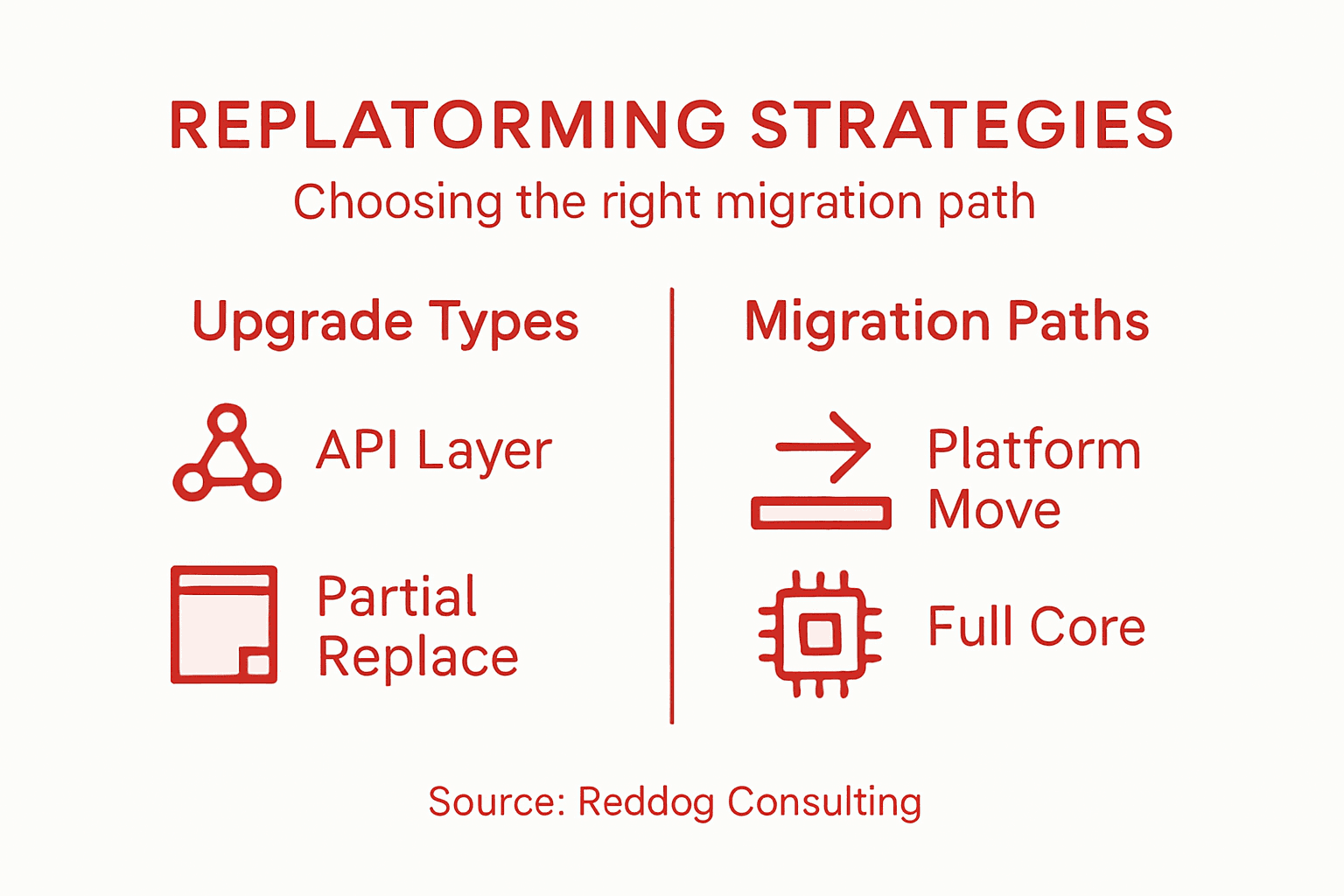
Not all replatforming projects look the same. Your business might need a complete overhaul, or you might just need to patch the biggest holes in your current system. Understanding the four primary replatforming strategies helps you pick the right approach for your situation, timeline, and budget. The path you choose determines how much disruption you’ll experience, how much you’ll spend, and how quickly you’ll see results.
This is the gentlest approach. You keep your existing system running exactly as it is, but you add a new layer of technology on top that allows modern tools to talk to your legacy platform. Think of it as building a translator between your old system and new applications. Your inventory management stays where it is, but your new marketplace integrations, analytics tools, and customer data platform can all communicate with it through APIs. This strategy works well if your core system is actually stable and doing its job, but it’s just isolated from everything else. The downside is you’re not solving the underlying limitations of the old platform. You’re just working around them.
With this approach, you replace specific parts of your operation while keeping others intact. You might move your customer-facing website to a modern platform while keeping your inventory and order management on the existing system. Or you could migrate your inventory system to a cloud-based solution while your website stays put. This creates more agility than API additions because you’re actually upgrading key functions. It’s also less risky than replacing everything at once. However, partial replacement means you still have multiple systems talking to each other, which requires solid integration planning. Many small retailers find this middle ground works best for their budgets and complexity tolerance.
This strategy involves moving your entire operation to a new, modern platform that was built for today’s demands. You’re not patching or adding layers. You’re changing everything at once. Cloud-based platforms like modern ecommerce platforms designed for omnichannel selling typically offer built-in features for multiple sales channels, inventory synchronization, and customer data integration. The advantage is you get a fresh start with technology built for how you actually work now. The challenge is the migration itself requires careful planning, data mapping, and usually some downtime or parallel running periods.

This is the most comprehensive approach. You replace not just your customer-facing systems but your entire backend infrastructure, including how you manage inventory, orders, customers, and finances. Everything moves to new technology. This is the riskiest approach because everything changes at once, but it’s also the most transformative. You eliminate technical debt completely. You gain modern capabilities from day one. You have no legacy constraints holding you back. However, this approach requires the most planning, the biggest budget, and the most change management. Retailers typically choose this route when their current systems are genuinely outdated or when they’re experiencing significant growth limitations.
Here’s a comparison of ecommerce replatforming strategies and when each is best suited:
| Strategy | Best For | Typical Risks | Speed to Results |
|---|---|---|---|
| API Layer Addition | Stable legacy systems needing new features | Underlying platform limits remain | Fast (weeks to months) |
| Partial System Replacement | Upgrading key areas on a budget | Complex integration points | Moderate (months) |
| Platform Migration | Complete overhaul for modern needs | Downtime, data mapping challenges | Slow (months to year) |
| Full Core System Replacement | Breaking all legacy constraints | High operational risk | Slowest (months to year) |
The right choice depends on three factors. First, how badly is your current system limiting your growth? If you’re losing sales because you can’t sync channels properly, you need something more aggressive than an API layer. Second, what’s your budget and timeline? API additions are fastest and cheapest. Full replacements are slowest and most expensive. Third, how much change can your team handle? Some organizations need to move slowly to manage disruption. Others prefer ripping off the band-aid.
Pro tip: Map out your biggest pain points by channel or function, then match them to what each strategy would fix; the strategy that addresses your top three problems at a cost you can afford is likely your answer.
You don’t wake up one morning and decide to replatform just for fun. Something pushes you to it. That something is usually pain. Your system crashes during peak season. Your inventory numbers don’t match reality. You can’t launch a new sales channel without a three month development project. Your security team loses sleep over outdated infrastructure. These aren’t theoretical problems. They’re costing you money, customers, and sleep right now. Understanding what triggers a replatforming decision helps you know whether you’re at the breaking point or just frustrated.
The most obvious trigger is outdated legacy systems that inhibit digital growth. Your platform was built five or ten years ago when omnichannel retail didn’t exist. It can’t sync inventory across channels automatically. Adding new features takes months because the code is brittle and poorly documented. You’re competing against retailers who move twice as fast. Another major trigger is inability to support omnichannel experiences. You have a website, an Amazon storefront, and maybe a marketplace on eBay. Each one operates independently. A customer buys on your website, and your in-store staff has no idea because inventory didn’t sync. This disconnect frustrates customers and creates operational chaos.
Security concerns represent a third trigger many retailers overlook until it’s critical. Older platforms run on technology no longer supported by vendors. Security patches don’t exist. You’re exposed to data breaches. Operational inefficiencies make up the fourth trigger. Your team spends hours each day manually syncing data between systems, updating spreadsheets, and chasing inventory discrepancies. That’s time they could spend on customer service or growth initiatives instead.
Review the most common triggers and measurable benefits for retailers replatforming:
| Trigger for Change | Measurable Benefit After Replatforming |
|---|---|
| Legacy system limitations | 30-40% better inventory accuracy |
| Poor omnichannel support | Frictionless cross-channel experiences |
| Security vulnerabilities | Reduced breach and compliance risk |
| Manual operations | 50% less manual data entry required |
When you replatform successfully, the benefits are tangible and measurable. The first benefit is enhanced customer experiences. Customers can browse on mobile, add items to cart, switch to your website, and complete checkout on a tablet. They can check inventory in-store through an app and pick up online orders the same day. These seamless experiences increase customer lifetime value and reduce cart abandonment.
The second benefit is improved operational agility. Your team can launch a new marketing campaign without waiting months for IT. You can test a new sales channel in weeks instead of quarters. This speed matters in retail where trends move fast. You gain reduced technical debt, which means you’re not paying engineers to maintain ancient code. They can focus on building features customers actually want. Scalability is another major benefit. Your new platform grows with your business. You don’t hit a ceiling at ten thousand SKUs or five million dollars in annual revenue. You can expand without fear of your technology becoming a constraint.
Perhaps most importantly, you gain the ability to innovate and launch new services quickly. You can add subscription options, personalized recommendations, or loyalty programs without the months-long development cycles of the past. You can also collect and act on valuable customer and operational data that your old system couldn’t track, giving you competitive insights your competitors might miss.
Pro tip: Calculate the cost of your current status quo by tracking time spent on manual processes, lost sales from cart abandonment or inventory errors, and security incidents over the past year; this number often justifies replatforming costs in less than 18 months.
Replatforming isn’t free, and it’s not painless. For small and medium-sized businesses operating on tight budgets and tighter timelines, the risks can feel overwhelming. You’re not just buying new software. You’re disrupting operations, retraining staff, migrating years of customer data, and betting that the transition goes smoothly. When it doesn’t, the costs multiply fast. Understanding these risks upfront helps you plan better, budget more realistically, and make decisions with eyes wide open.
Start with the technology investment itself. Enterprise ecommerce platforms cost anywhere from 50,000 to 500,000 dollars depending on complexity and vendor. That’s just the software license. Implementation consulting typically adds another 30 to 40 percent on top. Data migration services cost extra. Custom integrations with your existing accounting, inventory, or fulfillment systems cost extra. Training your team to use the new platform costs extra. Then you have ongoing maintenance, support, and hosting costs that are usually higher than what you’re paying now. For an SMB with limited IT resources, these costs add up quickly to six figures.
Beyond the dollars, there’s the cost of operational disruption during migration. Your team will spend hundreds of hours on the replatforming project instead of running the business. During the cutover period, you might experience downtime. Customers might not be able to place orders for a few hours or a day. Sales during that window are lost. If you’re moving during a peak season, that disruption could cost you tens of thousands in lost revenue. Data migration introduces risk too. What if customer records don’t transfer correctly? What if order history gets corrupted? Your team suddenly has to reconcile discrepancies while also learning new systems.
Here’s where SMBs face a different challenge than larger retailers. You need executive buy-in to move forward on something this expensive. Your owner or board needs to understand why replatforming is worth the investment. That requires clear communication about the problems you’re solving and the return you expect. If you can’t articulate that clearly, the project gets delayed or killed.
The good news is that risks can be managed. A phased migration approach reduces pain significantly. Instead of moving everything at once, you move in waves. Your website goes first. Once that’s stable, you integrate your marketplace channels. Once that’s working, you migrate inventory management. This staged approach means you’re never completely dependent on a system that’s not yet proven. If problems emerge in wave one, you fix them before wave two starts. You don’t have to shut down your entire business to fix a critical issue.
Throttle your traffic during cutover periods. Move your customers to the new system gradually instead of flipping a switch. Run both systems in parallel for a few days to catch discrepancies before they become problems. These methodical approaches take longer overall, but they control risk, reduce downtime, and let you fine tune the new platform gradually. For businesses with limited IT resources, this is essential.
Pro tip: Build a detailed cost model that includes technology, implementation, training, and your team’s time, then add 25 percent as a contingency buffer; compare that total cost to your projected revenue increase over three years to verify the ROI makes sense before you commit.
The migration itself is where theory meets reality. You have a plan. You have a timeline. You have stakeholder buy-in. Then you start moving data and systems, and things get messy fast. The key to surviving migration with your omnichannel strategy intact is understanding the sequencing. You can’t just flip a switch and move everything at once. That approach guarantees downtime, lost sales, and angry customers. A phased migration approach spreads the risk and lets you catch problems before they cascade across your entire operation.
Start by understanding your current landscape. What systems are you moving away from? What data lives where? How do these systems currently connect to your sales channels? This evaluation phase takes time but saves months of problems later. You need to understand the dependencies. Your website depends on inventory. Your fulfillment system depends on orders. Your marketplace integrations depend on product data. Map it all out before you touch anything.
Next comes the staged rollout. Successful migration moves in stages rather than one big switch that shuts everything down. Start with high-traffic discovery pages like your homepage and category pages. These pages don’t create critical business risk if something goes wrong. Customers can still browse. Move those pages to the new platform first. Test them thoroughly. Once they’re stable, move your product detail pages. Then tackle transactional pages like shopping cart and checkout. Save the most critical backend systems for last.
Each wave of migration includes careful testing before the next wave starts. You run both the old system and new system in parallel for a period. You watch data flow through both. You compare results. Only when you’re confident the new system handles that part correctly do you commit fully and shut down that function on the old system.
The real complexity happens in the backend. Your marketplace channels need to talk to your inventory system. Your fulfillment system needs to talk to your order management system. Your accounting software needs to talk to everything. During migration, you have two choices for each integration. You can update the integration to point to the new system. Or you can keep integrations pointing to the old system while you migrate that component. The second approach is slower but safer. You’re never trying to integrate systems that are both brand new at the same time.
Customer experience must stay consistent throughout. Customers shouldn’t notice you’re migrating. They shouldn’t see checkout errors because systems haven’t synced yet. They shouldn’t place orders that don’t reach fulfillment. This means you need a detailed omnichannel integration strategy that covers how each channel connects to each system during migration. Plan for how Amazon orders, marketplace orders, website orders, and in-store orders all move through the new environment simultaneously.
Testing is where you catch problems before customers do. Automated testing handles routine functionality. Manual testing by people who actually understand retail operations catches edge cases. What happens when a customer buys something that’s out of stock? What happens when a warehouse worker cancels an order in the new system? These scenarios matter. Test them all before you go live.
Pro tip: Create a detailed runbook for each migration wave that documents every system that will be affected, every integration point, every backup plan if something fails, and who is responsible for monitoring each piece during cutover; share it with the entire team at least one week before migration starts so everyone knows exactly what to expect.
If outdated platforms and fragmented sales channels are holding your retail business back from true omnichannel success this is your moment to act. The challenges of inventory inaccuracies slow integrations and the inability to scale can feel overwhelming but they do not have to limit your growth anymore. Leveraging advanced ecommerce replatforming strategies alongside proven digital transformation services can boost operational agility and customer satisfaction.
Explore how Digital & Business Consulting Services by Reddog Consulting can help you overcome legacy system limitations and achieve frictionless channel integration today. With years of expertise managing thousands of SKUs and accelerating marketplace performance we provide tailored strategic guidance and execution that align perfectly with your replatforming goals. Don’t let technical debt slow your progress visit https://reddog.group now and start your journey to scalable omnichannel mastery.
Ecommerce replatforming is the process of moving away from outdated legacy systems to modern cloud-based platforms that support current and future business needs, improving operational efficiency and customer experiences.
Common triggers include outdated legacy systems, inability to support omnichannel experiences, security vulnerabilities, and manual operational inefficiencies that hinder business growth.
The four primary strategies are API Layer Addition, Partial System Replacement, Platform Migration, and Full Core System Replacement, each varying in complexity, cost, and implementation speed.
Retailers can see improved inventory accuracy, enhanced customer experiences, reduced manual operations, increased operational agility, and the ability to innovate and launch new services more quickly.
Leave a comment: