
Published: March 2020 | Last Updated:October 2026
© Copyright 2026, Reddog Consulting Group.

The most popular Amazon listing template advice starts with keywords and ends with persuasive bullets. That's the wrong starting point for a CPG brand. A page can read well, attract shoppers, and still lose money because the pack count is unclear, the images show obsolete packaging, or operations measured the wrong shipping unit.
Treat the template as a controlled catalog record tied to contribution margin, not a copywriting worksheet. Amazon's product detail page rules explain that detail pages don't belong to individual sellers and must describe the product rather than a seller's promotion. Your job is to maintain an authoritative record that connects what shoppers see with what the warehouse ships and what the business earns.
Build the field map before anyone writes copy. Keep the customer-facing fields in page order, then attach operational fields to the same SKU record rather than leaving them in a separate launch spreadsheet.
Listing template fields, limits and owners
| Field | Limit or rule | Template must hold | Owner |
|---|---|---|---|
| Title | 75 characters including spaces for most categories | Brand, product type, one differentiator, pack count | Brand team |
| Bullets (item highlights) | Up to 5; 125 characters each where that attribute format applies | One customer job per bullet, with evidence reference | Brand team |
| Description | Accurate, product-only content | Usage, contents, care, validated claims | Brand team |
| Backend search terms | Byte limit set per category; confirm in Seller Central | Relevant synonyms and misspellings missing from visible copy | Brand team |
| Main image | Pure white background; product fills about 85% of frame | Approved file tied to current packaging version | Creative |
| Additional images and video | Recommended six additional images plus one video | Shot list mapped to customer questions | Creative |
| Dimensions and shipping weight | Determine the fulfillment size tier | Item and shipping measurements per child SKU | Operations |
| Variation theme | One permitted theme per family; children must match | Child attributes and parent-child links | Catalog |
| A+ content | Requires Brand Registry access | Approved module plan and asset list | Marketing |
The copy limits and bullet structure follow Amazon's listing guidance: most titles have a 75-character limit including spaces, with up to five bullets and a 125-character limit where that highlight format applies. Amazon's image workflow guidance recommends six additional images and one video; the framing and background specifications also belong in the creative brief, not just the upload checklist.
A department name is the starting point. Assign a named approver, an evidence-file location, and an update trigger inside the working record.
Practical rule: A field without an owner will be edited by whoever touched the listing last.
Use a protected spreadsheet, product information management system, or structured database. The tool matters less than controlling who can change approved facts and how those changes reach Seller Central.
Write from the physical product outward. Open the approved label, specification sheet, and category attribute requirements before opening a keyword tool.
Amazon's product detail page rules limit titles to 75 characters including spaces for most categories and item highlights to 125 characters each, while requiring clear, customer-helpful writing. Those constraints force prioritization: identify the product first, then explain why the right buyer should choose it.
Keyword research tells you how shoppers describe a need. It doesn't give you permission to claim your product meets that need.
For a hypothetical 12-count variety pack, state the count once in the title and use the bullets to explain the flavor mix. Repeating the count throughout the copy wastes room that could resolve questions about assortment, preparation, or storage.
Don't confuse factual repetition across structured attributes with repetitive selling copy. Amazon may need pack quantity in a dedicated attribute even when shoppers can see it in the title; that's catalog completeness, not an invitation to repeat the same sentence everywhere.
All-capital titles make routine product information harder to read. Unsupported language such as best or clinically proven creates an approval problem that a character counter can't catch.
Use spreadsheet validation for length, but review meaning manually. A title can fit the field and still identify the wrong child variation, imply an included accessory, or attract shoppers looking for a different format.
Keep approved copy separate from test candidates. Otherwise, an experiment can become the new catalog truth without anyone checking the package or updating the evidence record.
Test the template on a complete child SKU before duplicating it across the catalog. The following coffee record is illustrative, including its product specifications, price, copy, and inventory assumptions.
| Field | Filled example |
|---|---|
| Product | A 250 g bag of ground medium-roast coffee, sold as one unit |
| Selling price | $14.99 |
| Title | Brand Ground Medium Roast Coffee, 250 g Bag |
| Ingredient bullet | Ingredients: ground coffee; Colombian origin identified on the approved label. |
| Use-case bullet | For drip machines or French press; follow the brewer's preparation instructions. |
| Contents bullet | Includes one 250 g bag; net weight appears on the front label. |
| Performance bullet | Standard drip grind; confirm suitability for your brewing method. |
| Care bullet | Store sealed at room temperature after opening. |
| Description | Follow the brew ratio printed on the pack. Use the printed roast date to guide freshness. |
| Backend candidates | java; ground coffe |
| Launch inventory | 1,200 units |
| Expected weekly sales | 40 units |
| Initial supply | About 30 weeks, before inbound timing or demand changes |
The backend entry is a candidate list, not an upload-ready field. Remove title-word duplication, validate relevance, and check the byte allowance before submitting it.
For the image brief, use a pure white main image with the bag occupying about 85% of the frame, followed by six additional images and one video, consistent with Amazon's image guidance. The supporting slots show the bag beside a mug, measured dimensions, brewing, label ingredients, comparison with a pod format, and lifestyle context.
Operations measures the packed bag and records actual shipping weight and dimensions before the fee estimate is approved. Don't substitute the supplier's carton dimensions or guess measurements from the artwork.
The inventory calculation should prompt a purchasing decision, not merely populate a cell. If that supply exceeds the brand's approved guardrail, reduce or stage the buy before committing cash.
Plan images as a storyboard tied to the sellable unit. The creative brief should tell the photographer which uncertainty each asset must resolve.
This storyboard illustrates how to organize that brief.
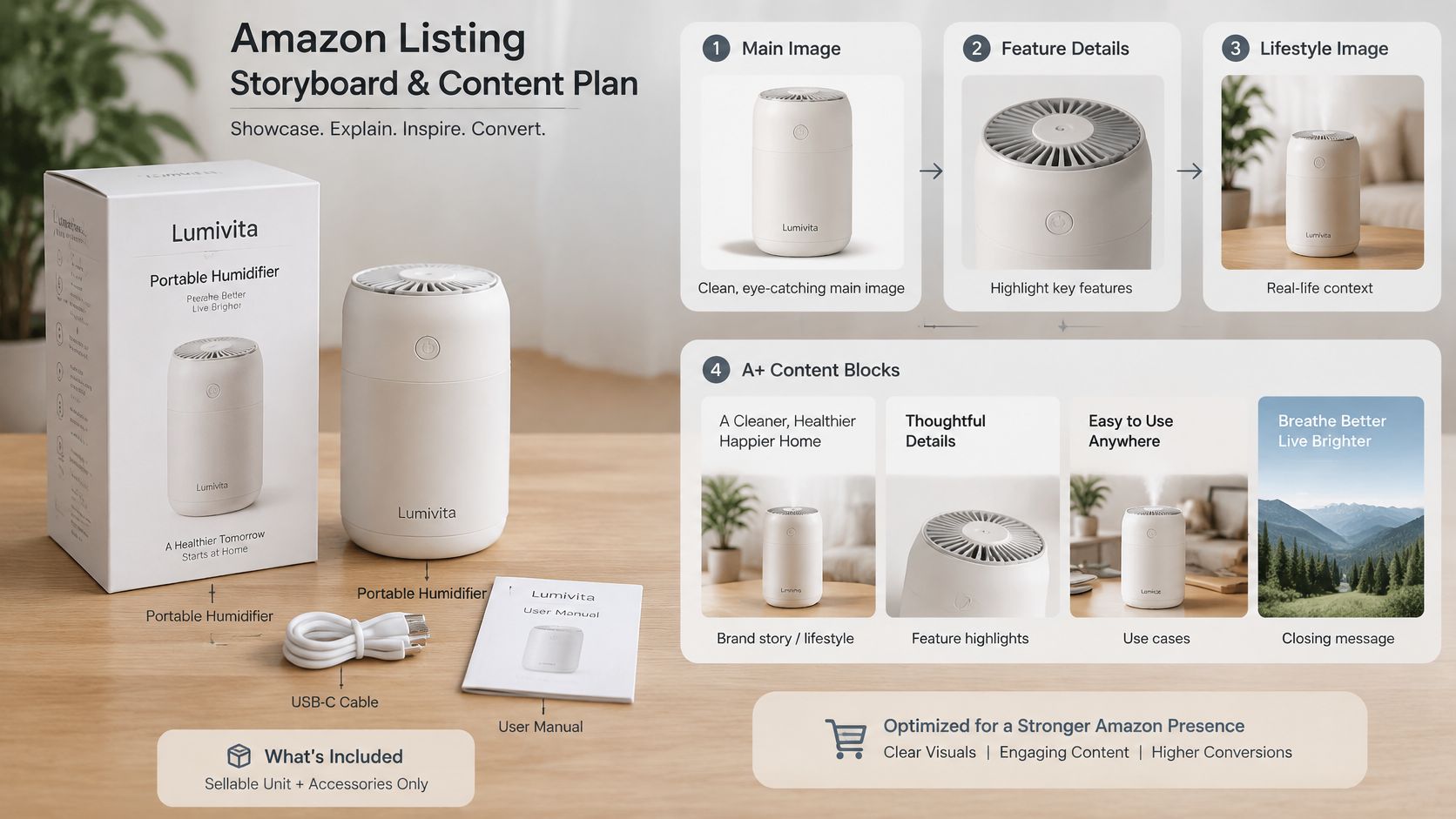
Amazon's product image requirements require at least one compliant image, recommend six additional images and one video, and specify a pure white main-image background of RGB 255,255,255 with the product occupying approximately 85% of the image area. Treat these as production specifications, not finishing touches.
Overlaid text needs to remain readable on a phone. If the shopper must enlarge the image to understand its central point, simplify the message rather than shrinking the type.
Run creative QA against a physical sellable unit. Check color, quantity, regional packaging, included accessories, and the relationship between the image and the selected variation.
Log replacement triggers explicitly: packaging redesign, formula change, revised warnings, altered dimensions, changed contents, or a new compatibility specification. Use the Amazon image requirements checklist to turn those checks into a repeatable release process.
For eligible Brand Registry accounts, plan A+ modules around questions that need more explanation than a bullet allows. A comparison module, usage sequence, or ingredient explanation may repeat an approved claim in another format, but the underlying claim must stay identical.
Use the video brief to demonstrate the product in use within the first 15 seconds as an editorial production target, not an Amazon requirement. Give the video its own packaging and formula replacement triggers.
This video can support the team's listing-production discussion.
More assets aren't a conversion guarantee. Better answers to purchase questions are the reason to produce them.
Evaluate changes through controlled tests using detail-page sessions, add-to-cart behavior, unit session percentage, returns, and contribution margin. Amazon can select and arrange submitted images, so confirm what appears after publication rather than treating upload completion as launch approval.
A master template should standardize governance, not erase category differences. A snack, supplement, and cleaning concentrate need different evidence and different release checks even when their page layouts look similar.
Pull the current product-type requirements from Seller Central before building the category branch. Distinguish Amazon-required attributes from regulatory requirements and helpful shopper information; they aren't interchangeable.
Category-specific template additions and main risks
| Category family | Extra fields to add | Main risk |
|---|---|---|
| Food and beverage | Ingredients, allergens, net weight, storage, country of origin | Copy that differs from the label |
| Supplements | Serving size, active amounts, supplement facts, warnings | Health claims without an evidence file |
| Beauty and personal care | Full ingredient list, skin or hair type, usage directions, expiry or batch | Formula or shade change not reflected in listing |
| Household and cleaning | Active ingredients, hazard and safety warnings, surface compatibility | Hazard language missing or inconsistent |
| Apparel and variation-heavy | Size chart, color, fit, care, child-level dimensions | Child data mixed into the parent record |
For food and beverage, approve the ingredient and allergen record before polishing benefit language. A flavor change can affect more than the product name, so the copywriter shouldn't infer composition from a related SKU.
Supplements need a claim-by-claim evidence review. A supplier's ingredient document doesn't automatically substantiate a finished-product performance claim, and an internal approval doesn't replace category or regulatory review.
Beauty teams should tie formula and shade information to the exact version being shipped. If old and new inventory overlap, operations and catalog staff must agree on what the page can accurately represent.
For household products, resolve hazard wording, usage restrictions, and surface compatibility before producing promotional imagery. A lifestyle photograph can imply a use that the written directions prohibit.
Variation-heavy catalogs need a permitted theme and a clear parent-child field map. Keep size, shade, fit, and other child-specific facts attached to the correct child rather than allowing them to become family-wide claims.
Use a separate checklist for each category branch. Reusing an approved sentence is efficient only when the evidence, product, and permitted context still match.
A listing can become commercially unworkable before advertising starts. In an illustrative example described alongside Amazon's FBA fulfillment fee schedule, a $0.49 fee increase on a $12 product generating $4.50 before fulfillment consumes roughly 11% of that contribution before advertising; the schedule also states a 3.5% fuel and logistics surcharge on U.S. and Canadian FBA fulfillment fees beginning April 17, 2026.
That's why packaging measurements belong beside the copy. A creative decision to add a sleeve, insert, or larger outer pack can change the shipping economics without changing the product's selling proposition.
The fee relationship belongs in the launch review.
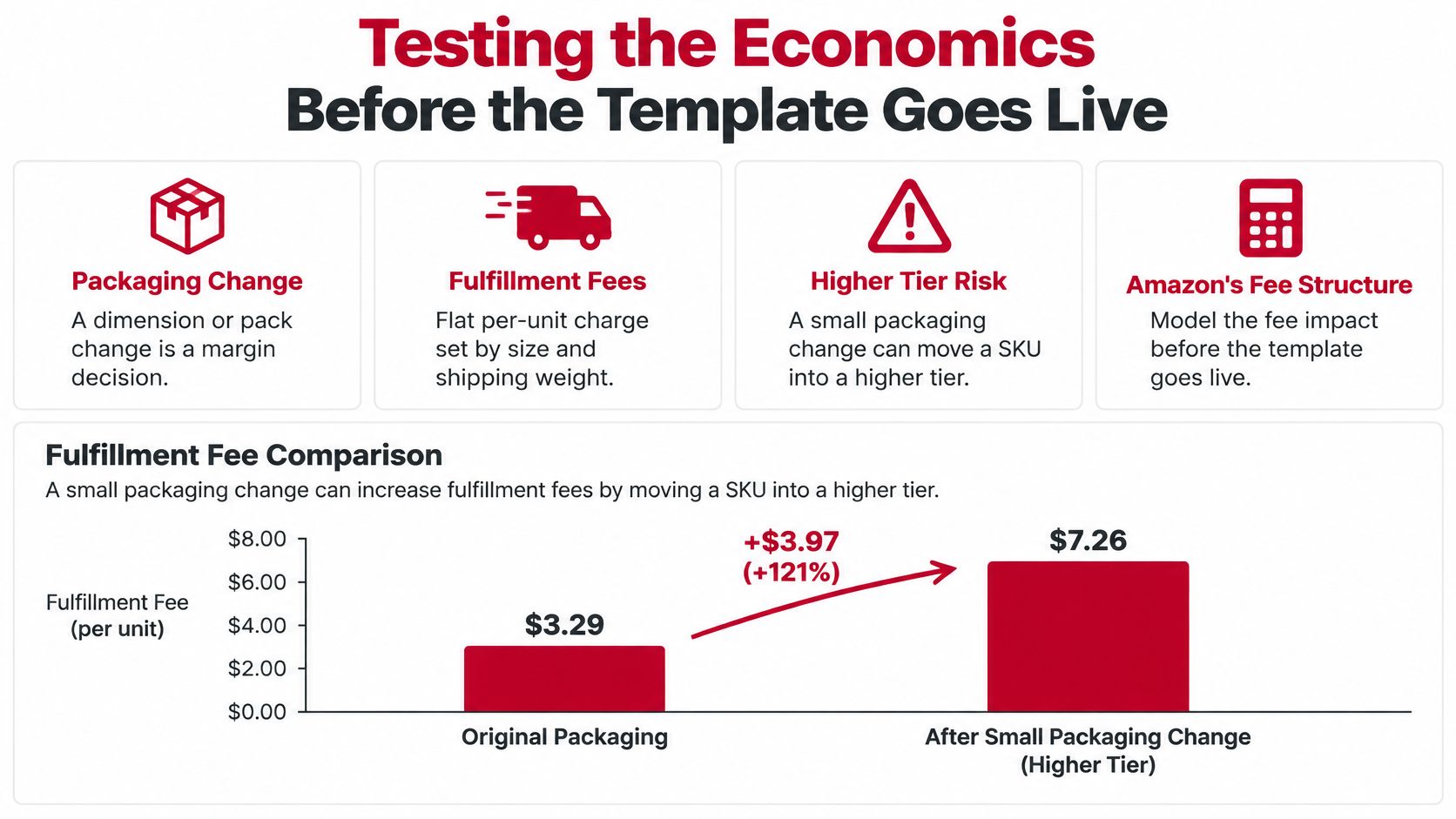
Measure the final prepared unit, then compare its fee estimate with the proposed packaging. Amazon calculates fulfillment charges using size and shipping weight, so an attractive package isn't automatically an economical package.
Build a contribution margin calculation that subtracts referral fees, fulfillment, landed product cost, prep, inbound costs, expected returns, and advertising. Keep the before-advertising subtotal visible so the media team knows how much room is available to acquire an order.
Then test the launch buy against realistic weekly velocity. Amazon's Inventory Performance Index guidance illustrates the inventory exposure: 2,000 units at 50 units per week represent about 40 weeks of supply before inbound timing or demand volatility.
Economics checks before scaling a listing template
| Check | Example | What it shows |
|---|---|---|
| Fee tier shift, illustrative | Compare the approved pack with the proposed larger pack | The fulfillment increase can consume pre-advertising contribution |
| Launch buy | Divide purchase quantity by realistic weekly sales | Whether inventory exceeds the approved supply guardrail |
| Low-price band | Small-standard fees rise about $0.12 on average below $10 | Single-unit economics differ from the standard price band |
| Standard price band | Small-standard fees rise about $0.25 on average from $10 to $50 | Price and pack choices affect fulfillment economics |
| Two-pack versus single | Higher order value, heavier and larger shipment | Confirm the fee tier before choosing the pack |
The price-band figures come from Amazon's 2026 fee summary: average increases are $0.12 for small-standard products below $10, and $0.25 for small-standard versus $0.05 for large-standard products priced from $10 to $50.
A multipack can improve contribution dollars per order while reducing conversion among shoppers who want a trial quantity. It can also consume inventory faster in units without improving cash recovery if discounts and fulfillment absorb the extra revenue.
Compare the single and multipack in the same sheet. Include the selling price, complete variable costs, expected acquisition cost, inventory commitment, and return exposure.
Release gate: Don't approve a larger launch buy merely because the listing looks ready.
A stronger page can improve demand. It can't repair a pack architecture that loses money at the price shoppers will pay.
A template is a controlled record, and control is where teams cut corners. Standardized fields save time when each one has an owner, an evidence source, and a release condition. The same fields become a liability when approval stays informal and the spreadsheet drifts from the product on the shelf.
In 2023, 40% of consumers reported returning an online purchase because of inaccurate product descriptions, according to Retail Dive, as cited by ReadyCloud's ecommerce statistics. The figure covers online retail broadly rather than Amazon alone, and the warning still lands: description accuracy shapes customer expectations and the cost of serving every order.
Catalog review needs a named operator. A filled-in document proves someone completed the fields; it says nothing about who answers for them afterward.

Giftable products add one more trap: copy written for the occasion can crowd out the record's facts. A brand post such as bath time surprises from Jackpot Candles shows how far emotional appeal can carry a giftable product; the Amazon record still needs exact contents, usage details, and applicable warnings alongside that appeal.
Catalog management is an efficient process that keeps product listings accurate, consistent, and optimized. In practice, that means a change log per SKU, a named owner for every claim, and review triggers tied to packaging and regulatory changes.
Hold publication when an approval field is empty, evidence doesn't match the current product, or the purchase order exceeds the weeks-of-supply guardrail. Keep approval history in the authoritative record so a later edit never erases why a claim or measurement was accepted.
RedDog's Foundation → Optimization → Amplification sequence fits this work naturally. Foundation establishes product truth and viable economics. Optimization tests presentation and acquisition. Amplification increases spending and inventory only when contribution and velocity justify it.
Bring your listing template, current fee schedule, and weekly sales velocity to a strategy call with Reddog Consulting Group, and use the session to pressure-test listing accuracy, contribution margin, and launch planning. Book a margin-focused strategy call, or visit Reddog Consulting Group to see the firm's marketplace work across Amazon, Walmart, Target, NewEgg, and Shopify.
Leave a comment: