
Published: March 2020 | Last Updated:July 2026
© Copyright 2026, Reddog Consulting Group.

TL;DR:
- Selling on Amazon involves selecting the right account type, pricing strategically, and choosing fulfillment methods based on product specifics. Profitable sellers track all costs, optimize advertising, and manage inventory carefully to avoid low margins. Starting with the Professional plan and using FBA or FBM wisely help maximize visibility and conversions while maintaining margins.
Selling on Amazon is defined as the process of registering a Seller Central account, selecting a selling plan, creating product listings, choosing a fulfillment method, and managing fees to generate profitable sales. If you want to know how do I sell stuff on Amazon, the answer starts with two decisions: which account type fits your volume, and whether Fulfillment by Amazon (FBA) or Fulfillment by Merchant (FBM) serves your margins better. Amazon seller fees in 2026 typically represent 25–38% of a product’s selling price before advertising. That number alone tells you this channel rewards sellers who plan their costs before they list their first product.
Amazon offers two selling plans, and picking the wrong one costs you more than money. It costs you visibility.
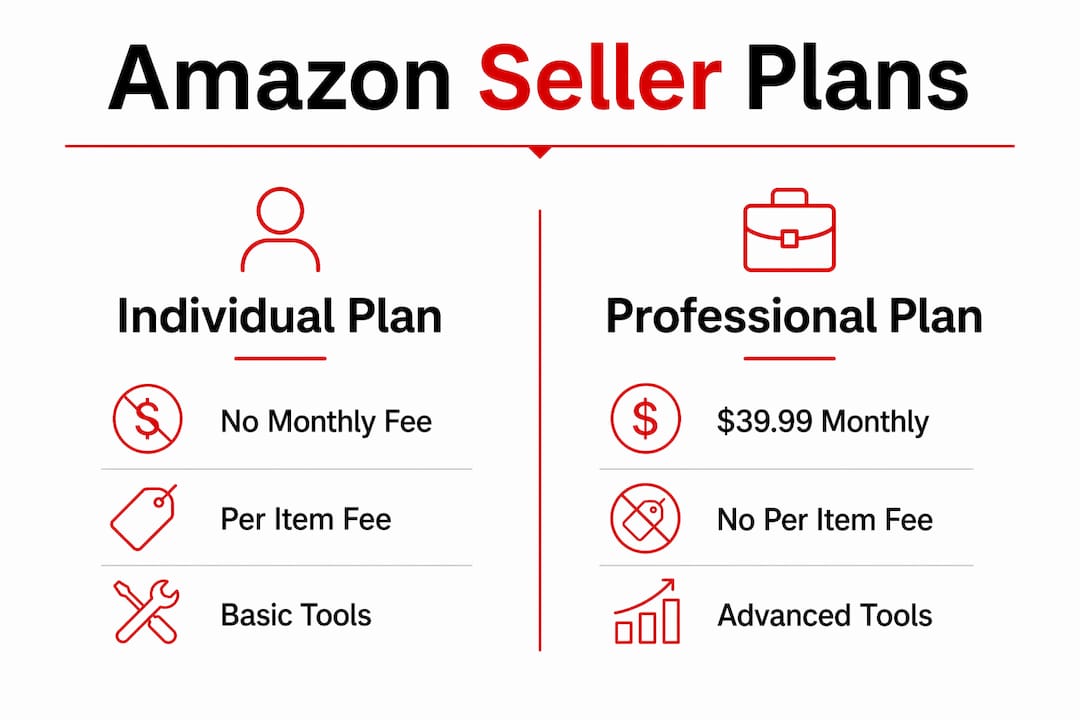
The Individual plan charges $0.99 per item sold with no monthly fee. It gives you access to basic listing tools, but you cannot run Amazon Ads, access bulk upload features, or qualify for Brand Registry. The Professional plan costs $39.99 per month with no per-item fee and unlocks every major selling tool on the platform.
The common break-even math says: sell more than 40 units per month and the Professional plan pays for itself. That math is incomplete. The 40-unit break-even rule misses the opportunity cost of being unable to advertise, manage inventory at scale, or access enhanced content tools on the Individual plan. A seller moving 35 units per month with no ad access is losing organic rank every day.
Here is a direct comparison of the two plans:
| Feature | Individual plan | Professional plan |
|---|---|---|
| Monthly fee | None | $39.99 |
| Per-item fee | $0.99 | None |
| Amazon Ads access | No | Yes |
| Buy Box eligibility | Limited | Yes |
| Bulk listing tools | No | Yes |
| Brand Registry access | No | Yes |
Pro Tip: If you plan to sell more than 20 units per month within your first 90 days, start with the Professional plan. Delaying the upgrade means losing early organic rank and conversion data you cannot recover.
Amazon prohibits multiple Seller Central accounts without written approval. Each account requires distinct legal and operational entities. Cross-account inventory or ad budget sharing is prohibited. Plan your business structure before you register.
A product listing on Amazon is your storefront, your sales pitch, and your search ad all in one. Getting it right from the start matters more than most new sellers realize.
Follow these steps to create a listing that converts:
Pricing strategy on Amazon is not about being the cheapest. It is about being the most competitive at your margin floor. If your referral fee is 15% and your FBA fee adds another 12%, you need to know your cost of goods before you set a price, not after.
Pro Tip: Use Amazon’s Revenue Calculator in Seller Central to model your net margin at different price points before you commit to a listing price. Adjust for referral fees, fulfillment costs, and advertising spend.

Good Amazon SEO practices also affect how often your listing appears in search results. Backend keywords, accurate category selection, and strong bullet points all contribute to organic rank. Treat your listing like a search-optimized product page, not just a catalog entry.
Fulfillment is where most sellers either protect or destroy their margins. The two primary methods are FBA and FBM, and the right answer depends on your product, not your preference.
Fulfillment by Amazon (FBA) means you ship inventory to Amazon’s warehouses. Amazon picks, packs, ships, and handles customer service. Your products become Prime eligible. FBA costs roughly 23% more than FBM but converts at 2.1 times the rate. Products with an average order value above $18 benefit from FBA’s higher conversion. That data comes from an analysis of 50,000 orders.
Fulfillment by Merchant (FBM) means you store and ship products yourself or through a third-party logistics provider. You control shipping speed and costs, but you lose Prime eligibility unless you qualify for Seller Fulfilled Prime, which has strict performance requirements.
| Factor | FBA | FBM |
|---|---|---|
| Prime eligibility | Automatic | Requires SFP approval |
| Conversion rate | 2.1x higher | Baseline |
| Fee structure | Higher (fulfillment + storage) | Lower (you control shipping) |
| Best for | High-velocity, compact products | Heavy, slow-moving, or low-margin items |
| Customer service | Handled by Amazon | Handled by seller |
Amazon added a 3.5% fuel and logistics surcharge on all FBA fulfillment fees in april 2026. Storage fees range from $0.78 to $2.40 per cubic foot depending on the season. Those numbers change your FBA math meaningfully for bulky or slow-moving products.
The best sellers do not choose FBA or FBM for their entire catalog. They assign fulfillment methods per SKU based on margin. A compact, fast-moving supplement goes FBA. A heavy, low-margin cleaning product might go FBM. That per-product discipline is what separates profitable sellers from ones who wonder where their margin went.
Pro Tip: Calculate your Average Order Value (AOV) for each product before assigning a fulfillment method. If AOV is below $18, run the FBM numbers first. FBA’s conversion lift may not offset its fee premium at that price point.
For a deeper look at whether FBA fits your brand’s economics, Reddog’s analysis on FBA profitability by brand type breaks down the decision by product category and margin structure.
Amazon’s fee structure rewards sellers who track every cost line. Sellers who do not track end up profitable on paper and cash-negative in practice.
The main fee categories in 2026 include:
Total Amazon fees including subscription, referral, fulfillment, storage, and inbound placement fees typically represent 25–38% of a product’s selling price. Add advertising spend of 10–20% of revenue and your total cost burden can reach 35–50% of gross sales. That leaves very little room for error on thin-margin products.
Sponsored Products are the primary advertising format on Amazon and require a Professional account. They drive sales velocity and improve organic rank. Advertising is not optional for most new listings. Without it, your product sits on page 10 while competitors with ad budgets own page 1.
Reddog’s guide on Amazon advertising cost covers how to set bid strategies that protect margin while building rank. The goal is not to spend on ads. The goal is to buy data efficiently until organic rank carries the load.
New sellers run into the same problems repeatedly. Knowing them in advance saves real money.
Selling profitably on Amazon requires choosing the right account type, pricing with full fee awareness, and assigning fulfillment methods by product rather than by preference.
| Point | Details |
|---|---|
| Choose your plan deliberately | Professional plan at $39.99/month unlocks ads, Buy Box, and bulk tools that Individual plan blocks. |
| Price with total fees in mind | Referral, fulfillment, storage, and ad costs can total 35–50% of revenue. |
| Assign fulfillment per SKU | FBA converts 2.1x better than FBM but costs 23% more. Match method to product margin and AOV. |
| Advertise from day one | Sponsored Products build rank and velocity. Waiting means slower organic growth and lost early sales. |
| Track account health weekly | Order defect rate, late shipments, and inventory levels all affect your selling privileges. |
The sellers I see struggle most are not struggling because Amazon is hard. They are struggling because they made three foundational decisions without enough information.
The first mistake is starting on the Individual plan to “test the waters.” That logic sounds conservative. In practice, it locks you out of advertising during the exact window when your listing needs the most help. You cannot build rank without sales velocity, and you cannot build sales velocity without ads. The Individual plan traps you in that loop.
The second mistake is treating FBA as the default for every product. FBA is a powerful tool for the right SKU. For heavy, low-margin, or slow-moving products, FBA’s storage fees and the new fuel surcharge will eat your contribution margin faster than you expect. The per-SKU fulfillment decision is one of the highest-leverage choices you make as an Amazon seller.
The third mistake is ignoring the relationship between advertising spend and organic rank. Sellers often cut ad spend when margins feel tight. That is exactly the wrong move early in a product’s life. Ads buy data and rank. Once you have rank, you can reduce spend. Cutting too early means starting over.
The sellers who scale well on Amazon share one habit: they review their numbers by SKU, not by channel total. They know which products are profitable, which are subsidizing others, and which need to be repriced or discontinued. That clarity is what separates a growing Amazon business from one that is busy but not profitable.
— Reddog
Selling on Amazon is manageable when you understand the economics behind each decision. The fee structure, fulfillment math, and advertising dynamics all connect. Getting them wrong in year one is expensive.
Reddog works with CPG founders and operators in the $500K–$20M revenue range who need structured clarity on their Amazon channel. A free 30-minute strategy call covers your contribution margin by SKU, fulfillment cost structure, inventory velocity, and advertising efficiency. There is no pitch. It is a working session focused on where your margin is leaking and what to fix first. If you are ready to treat Amazon as a profit center rather than a cost center, book your strategy call and bring your numbers.
Create a Seller Central account at sell.amazon.com, choose Individual or Professional plan, and list your first product. The Professional plan at $39.99/month is the better starting point if you plan to advertise or sell more than 40 units per month.
Referral fees run 8–15% of the sale price depending on category, plus fulfillment and storage fees if you use FBA. Total fees including advertising typically reach 35–50% of gross revenue.
FBA converts at 2.1 times the rate of FBM and delivers Prime eligibility automatically. For products with an average order value above $18, FBA is usually the more profitable choice despite its higher fees.
Advertising via Sponsored Products is effectively required for new listings to build rank and sales velocity. The Professional plan is required to access Amazon Ads.
Amazon prohibits multiple Seller Central accounts without written approval. Separate accounts require distinct legal entities, separate branding, and independent operations. Cross-account inventory or ad sharing is not permitted.
Leave a comment: